GameChanger GoPro Setup: The Complete 2026 Rig Guide for Coaches and Parents
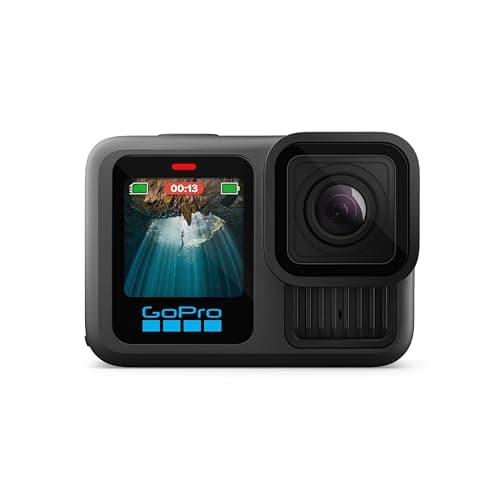
Search traffic for "gamechanger gopro" is up over 700% year-over-year. Walk any travel ball complex on a Saturday morning and you will see why. GoPros are showing up on backstops where iPhones used to live. The reason is simple: the GoPro handles heat, wind, and all-day battery life better than any phone, and the clamp-on-the-fence shot it produces is the best viewing angle in youth baseball.
This guide is the complete GoPro + GameChanger rig. The exact hardware, the step-by-step GoPro Quik setup, and the battery/SD-card/power strategy that keeps you broadcasting through doubleheaders without a mid-game scramble.
Disclosure: This article contains affiliate links. If you make a purchase through these links, The Dugout Edge may earn a small commission at no additional cost to you. We only recommend products we believe in and use on our own teams. Thank you for supporting our site!
See also: Best Cameras for GameChanger | Best Phone Mounts for GameChanger | How to Stream Your Kid's Baseball Games | GameChanger Troubleshooting Guide
Why Parents Are Switching to GoPro
Three reasons drove the shift, and they all come down to the same problem: phones are consumer devices being asked to do industrial work.
Heat. A phone sitting in direct sun at 3 PM in July will thermal-throttle within 45 minutes. The moment it throttles, the stream drops. GoPros are designed for surf, ski, and cycling, they shrug off heat that kills phones.
Battery under streaming load. A streaming iPhone with the screen on pulls 20-30% battery per hour. That is a dead phone by inning 5 without a power bank. GoPros with the new Enduro batteries run 2+ hours at 4K on a single battery, and you can swap in under 10 seconds.
The backstop-clamp angle. A GoPro clamped to the chain-link fence behind the plate gives you a pitcher's-mound-view framing that is impossible to get from a tripod 15-20 feet back. Every play looks closer. Every pitch looks more dramatic. Parents watching from another state get the best seat in the house.
How the GoPro gets to GameChanger: directly. GameChanger supports the Hero 7 Black through the Hero 13, plus the GoPro Max. You start the stream in the GameChanger app, it hands you to GoPro Quik to finish setup, and from then on the camera streams on its own at up to 1080p. The phone, iPhone or Android, starts it and usually supplies the internet through its hotspot. The section below walks through the exact steps.
The Rig: Exactly What You Need
Here is the full shopping list for a proper GameChanger + GoPro setup. Buy these in order; each one solves a specific problem.
1. The Camera: GoPro Hero 13 Black
Best Pick: GoPro Hero 13 Black with Enduro battery support

The Hero 13 Black is the right tool for the job. Native 5.3K at 60fps, HyperSmooth 6.0 stabilization (important when the wind rattles the backstop), and dual-Enduro battery support that no other GoPro generation has. That last point is the big deal, two Enduros will take you through a 3-hour game day at 4K without a recharge.
The Hero 12 Black is the fallback if the 13 is out of stock or the price is a stretch. Everything in this guide works identically with the Hero 12; the only difference is slightly shorter battery life and no dual-battery support. You can still run a doubleheader on a Hero 12, you just need to swap batteries between games.
Price: $399-$449 (Hero 13) / $299-$349 (Hero 12)
2. The Mount: Suptig Jaws Flex Clamp

This is the single most important accessory after the camera itself. GoPro's own Jaws Flex Clamp is discontinued, but the Suptig version is the same design at a third of the price: a spring-loaded jaw that grips chain-link fence, pole, or table edge, with an adjustable gooseneck for angling the camera once the jaw is set. It fits every Hero from the 3 up through the 13.
Position it at the top of the fence directly behind the plate for the best angle. Angle the camera down slightly to capture the strike zone, the hitter, and the catcher. Lock the knuckle tight, if it vibrates, your HyperSmooth will fix mild shake but cannot fix a loose mount.
Buy two. At this price it is barely a decision. One lives in the trunk as a backup, the second gives you an angle on the first-base dugout, and the pair costs less than the discontinued GoPro original did on its own.
Price: $15-$20
Shop the Jaws Flex Clamp on Amazon
3. Extra Batteries + Dual Charger: Enduro Battery Pack

The Enduro is GoPro's cold-and-heat-optimized battery, and it is a different animal from the standard GoPro battery. On a hot afternoon, standard batteries can fail dramatically, some will just shut off. Enduros keep running. For GameChanger use, the Enduro is not optional.
The dual charger is the companion. Plug it into a wall the night before, charge both batteries, and you have 3-4 hours of streaming capacity in your bag. At the field, a battery swap takes 20-30 seconds between innings.
GoPro sells an official Enduro dual-battery bundle that includes two Enduros plus the charger, that is what you want.
Price: $69-$79 (two-battery bundle)
Shop Enduro Battery Bundle on Amazon
4. MicroSD Card: SanDisk Extreme 128GB

GoPros are finicky about SD cards. Use the wrong card, even a card that "works" in a regular camera, and you will get random stream drops and recording errors. GoPro officially recommends V30 or U3 speed class cards. The SanDisk Extreme 128GB is the sweet spot: fast enough for 5.3K recording, big enough for a full game day (a 2-hour 4K recording eats about 40-50GB), and cheap enough to own two as backups.
Format the card in the GoPro itself before the first use, and re-format before every season. This is the #1 cause of first-game stream failures parents overlook.
Price: $40-$48
Shop SanDisk Extreme on Amazon
5. The Phone: iPhone or Android
Required: a phone that runs GameChanger (iOS 17 or newer, or Android 11 or newer) with GoPro Quik installed.
You do not need a new phone for this. The phone is not shooting the video. It starts the stream in GameChanger, finishes the setup in GoPro Quik, and usually shares its internet with the GoPro through its hotspot. Any phone that runs GameChanger handles that. Update Quik before game day: GameChanger lists a minimum Quik version for GoPro streaming.
Two things GameChanger calls out. A phone's personal hotspot has limited range from the GoPro, so either keep the phone near the backstop or use a dedicated hotspot, which GameChanger recommends. And because the camera does the streaming, you can often keep score on the same phone, but some camera apps drop the stream when they go to the background. Test it at practice, or score on a second device signed into the same account (GameChanger allows two).
See our best cameras for GameChanger guide for specific phone recommendations if you need to buy one.
6. Power Bank (for the Phone)

The GoPro's battery is handled by the Enduro bundle. The phone running the hotspot is still a battery drain. An Anker 10,000 mAh USB-C power bank keeps it at 80-100% all game. Cheap no-name power banks will trickle-charge at a rate slower than the phone is consuming, and it will still die mid-game on a $15 power bank. Spend $25-$30 for Anker or Mophie.
Price: $45-$55
Shop Anker Power Bank on Amazon
7. Optional: ND Filter for Bright Sun

If you shoot games in bright direct sun (any Saturday summer tournament in the Southeast, Texas, or SoCal), an ND filter is the difference between a blown-out unwatchable stream and a properly-exposed one. ND filters attach to the front of the GoPro lens and reduce light intake, preventing the sensor from clipping the highlights.
Most parents skip this. The ones who have used one never go back, the stream looks dramatically more professional. Buy a multi-pack (ND8, ND16, ND32) and use ND16 as your default.
Price: $70-$85
Shop GoPro ND Filter on Amazon
Step-by-Step Setup: GoPro + GameChanger
The first time takes about 20 minutes, so do it at a practice, not ten minutes before first pitch. After that, the pre-game ritual is 3-4 minutes.
Pre-game (day before)
- Charge everything. Both Enduro batteries in the dual charger. Power bank to 100%. Phone to 100%.
- Format the SD card in the GoPro (Settings → Camera → Format SD Card). Do this once per season minimum.
- Update GameChanger and GoPro Quik on your phone. GameChanger lists a minimum Quik version for GoPro streaming, and stale app versions are a common cause of failed streams.
- Pack the bag. GoPro + mount + extra battery + power bank + cables + cleaning cloth. Everything in one zipper pouch.
At the field (3-4 minutes)
- Mount the GoPro on the backstop using the Jaws Flex Clamp. Position at the top of the fence, directly behind the plate, angled down slightly. Lock the knuckles tight.
- Power on the GoPro and check the battery icon. If it is below 75%, swap in a fresh Enduro now, not mid-game.
- Turn on the hotspot (the phone's or a dedicated one) and run a speed test. Read the upload number: GameChanger recommends 7 Mbps or more for 1080p and 4 to 7 Mbps for 720p.
- Start in GameChanger. Pick your team, open the game from the Schedule tab, and tap Record Video. Tap External Camera, set the audience, and tap Continue to External Camera Setup.
- Finish in GoPro Quik. Tap GoPro and GameChanger opens Quik. Choose your camera, connect it to your network, pick 1080p or lower and the lens view, tap Continue, then Go Live. Set above 1080p and GameChanger will not broadcast or record the game.
- Verify the feed. About 30 to 45 seconds after the GoPro goes live, the Live tile appears in GameChanger. Tap it to watch your own stream.
- End the stream from Quik after the last out, not from GameChanger.
Pro tip: Keep the phone that runs the hotspot close to the backstop. GameChanger notes a phone hotspot has limited range from the GoPro, and a stream that drops because you walked to the concession stand is the most avoidable failure there is.
Mid-game management
- Battery swap on the GoPro between innings if needed. Pulling the battery powers the camera off, so the stream ends; restart it from Quik once the fresh battery is in, and warn the parents watching.
- Check the SD card fill periodically. A 128GB card at 5.3K shoots about 45 minutes per 30GB. Most doubleheaders fit on one card; full-day tournaments may need a swap. If the card fills during a GameChanger stream, the recording stops and the stream cuts off with it.
- Reposition only if absolutely necessary. Every time you move the mount, you risk a clamp that does not re-lock as tight. If possible, live with a suboptimal angle for the remaining game.
Common GoPro + GameChanger Problems and Fixes
The following are the issues I see most often on youth baseball forums and Reddit threads. Most are solvable in under 60 seconds once you know the fix.
Problem: The GoPro keeps losing its connection. Fix: Distance. A phone's personal hotspot has limited range from the GoPro, so move the phone closer to the backstop or switch to a dedicated hotspot, which is what GameChanger recommends. Then confirm Quik is updated to at least the version GameChanger lists.
Problem: The stream never shows up in GameChanger. Fix: Give it 30 to 45 seconds after Go Live; that is how long GameChanger says the Live tile takes to appear. If it still does not, check the resolution in Quik: above 1080p, GameChanger will not broadcast. Some GoPro users also connect more reliably with GameChanger's insecure RTMP ingest, which its help center documents as an alternative.
Problem: Stream is choppy or low quality. Fix: Weak upload at the field. Use a hotspot, not the ballpark's guest Wi-Fi, and run a speed test on the upload number. Under 7 Mbps, drop from 1080p to 720p.
Problem: Viewers can hear everything said behind the backstop. Fix: A GoPro cannot mute a GameChanger stream from its settings. GoPro's workaround, per GameChanger, is to plug in a mic adapter without connecting a mic.
Problem: GoPro overheats and shuts down anyway. Fix: You are using a standard battery, not an Enduro. OR the GoPro is in direct sun at over 95°F, move it into partial shade or attach a small sun shade. The GoPro's self-protection kicks in above 140°F internal temp.
Problem: SD card error mid-game. Fix: Format the SD card in the GoPro before every game. Do not format on a computer or in another device. A card formatted elsewhere may appear to work but will throw errors under sustained 4K recording.
For more comprehensive troubleshooting, see our GameChanger troubleshooting guide.
Simpler Alternative: Skip the Stream, Record Only
Some parents decide a live stream is more than they need. The alternative: use the GoPro as a record-only camera, skip GameChanger livestream entirely, and post the recorded game to YouTube, a shared Google Drive folder, or your team's private Facebook group after the game.
This rig is dramatically simpler:
- Mount GoPro, press Record, walk away.
- After the game, pull the SD card or transfer over Wi-Fi.
- Upload the raw file (or a trimmed highlight) to YouTube/Drive/Facebook.
- Share the link with team families.
You lose the live broadcast, but you gain 4K archival footage, 10 minutes back on every game day, and no troubleshooting. For rec league coaches, this is often the right call. For travel ball where grandparents watching from out of state really matters, the live stream is worth the setup.
Frequently Asked Questions
Can a GoPro stream to GameChanger?
Yes, directly. GameChanger supports the GoPro Hero 7 Black, 8, 9, 10, 11 Black, 12, and 13, plus the GoPro Max. Start the stream in GameChanger (Record Video, External Camera, GoPro), finish the setup in GoPro Quik on your iPhone or Android, and the camera streams on its own at up to 1080p. End the stream from Quik.
What is the best GoPro for GameChanger?
The GoPro Hero 13 Black is the best GoPro for GameChanger in 2026 because of Enduro dual-battery support (for all-day tournaments), native 5.3K recording, and HyperSmooth 6.0 stabilization. The Hero 12 Black is a solid budget alternative at $100 less, and the Hero 11 Black is fine if you find one used.
Do I need the GameChanger Streaming Kit if I have a GoPro?
No. The Streaming Kit is a carry case, an adjustable mount, and a tripod, with no camera. If you have a GoPro and a phone that runs GameChanger, a fence clamp does the mount's job for less.
What mount should I use for a GoPro on a baseball backstop?
A jaws flex clamp is the right mount for chain-link baseball backstops. It has a spring-loaded jaw that grips the fence wire securely and a gooseneck for angle adjustment. GoPro's own version is discontinued; the Suptig equivalent is the same design. Position it at the top of the fence directly behind home plate. Budget $15 to $20 for the clamp; buy two if you want a backup.
How long will a GoPro record a baseball game?
A GoPro Hero 13 with a standard battery records about 70-90 minutes at 4K/60fps. With an Enduro battery, expect 100-130 minutes. With two Enduro batteries and a swap between games, you can record a 3-hour doubleheader. Battery life drops in extreme heat (90°F+) and extreme cold (40°F-). Plan to swap batteries between games of a doubleheader.
Why is my GameChanger GoPro livestream laggy?
Stream lag is almost always a connection issue. The ballpark's guest Wi-Fi is typically too congested to handle live video at field level. Switch to a phone or dedicated hotspot and check the upload speed: GameChanger recommends 7 Mbps or more for 1080p and 4 to 7 Mbps for 720p. If it is still laggy, drop from 1080p to 720p; viewers watching on their phones cannot tell the difference.
Can I use a GoPro for GameChanger if I only have an Android phone?
Yes. GoPro Quik runs on Android, and GameChanger's GoPro streaming works from Android phones on Android 11 or newer. Start the stream in GameChanger, finish it in Quik, the same way as on an iPhone.
Ready to Buy?
If this is your first GoPro, the short list is:
- GoPro Hero 13 Black (the camera)
- Suptig Jaws Flex Clamp (the mount)
- Enduro dual-battery bundle (the power)
- SanDisk Extreme 128GB microSD (the storage)
- Anker 10,000 mAh power bank (for the phone)
Total cost around $550-$625 for a complete rig. One-time purchase, and you will use it for every game for years.
If you are still deciding between a GoPro and a phone-based rig, our complete camera comparison lays out every option side-by-side with honest pros and cons.
Once your rig is built, the how to stream your kid's baseball games article compares the destinations: GameChanger livestream, YouTube Live, Facebook Live, and post-game upload options, so you can pick the right destination for your team.
Tags
Score Your Next Game Free
Game Day scores live from your phone: runs, outs, baserunners, pitch counts. Free, in your browser, no account needed to start.
Try the Free Scoring App