Free Baseball and Softball Scorekeeping App
A digital scorekeeper for baseball and softball games. Track every pitch, play and out on any device, and finish with a real box score. No download and free to use.
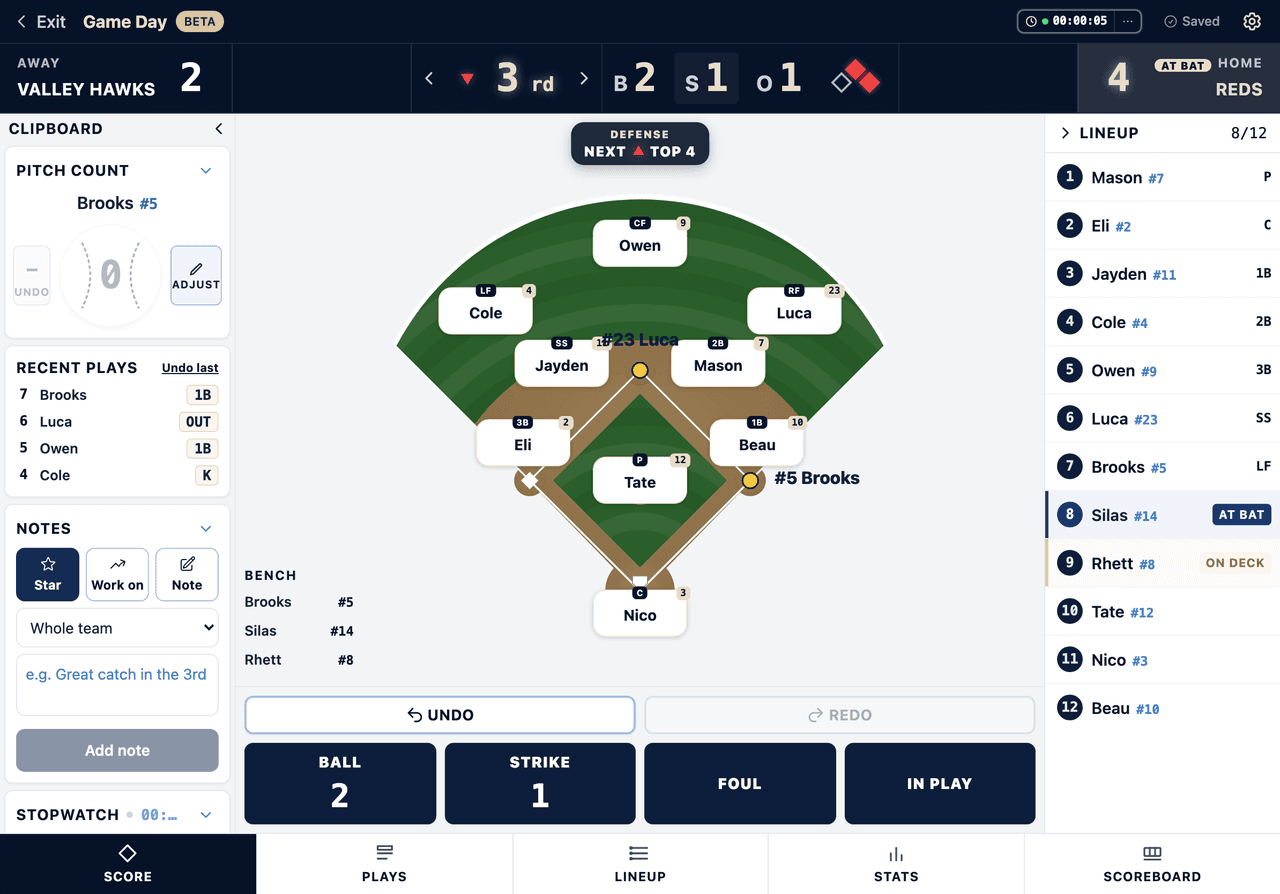
- Set positions and manage subs on a live field board
- Playing time tracked for every player
- Keep score by inning with a live scoreboard
- Outs, count, baserunners, and pitch counts as you tap
Everything You Need to Keep the Book
Every At-Bat, Recorded
Singles through home runs, walks, strikeouts, sacrifices, fielder’s choice, errors and the dropped third strike. Tap the plain-language result, not scorekeeping notation.
Pitch by Pitch, With a Live Count
Tap ball or strike and the count fills itself. Four balls walks the batter, three strikes is a strikeout, three outs flips the inning.
Runners, Steals and Defense
Hits and defensive plays advance runners on their own. Stolen bases, caught stealing, wild pitches and passed balls are one tap, and fielding chains like 6-4-3 credit the putouts and assists.
Pitch Counts With Your League Limits
Every pitch is logged to whoever is on the mound and carries across pitching changes. Set stacked warning thresholds for your league, and override the limit for an individual pitcher.
A Real Box Score at the End
Batting with AB, R, H, RBI, BB, K and AVG, pitching with IP, ER, K and pitch totals, and fielding with putouts, assists and errors. Print it, save it as a PDF, or export the CSV.
The Traditional Scorecard Grid
If you like the diamond grid, it is right there, filled in for you as you tap. Every at-bat lands in the cell a paper scorebook would put it in.
Hit Location and Spray Charts
Tap where the ball landed and the game builds a spray chart, so you can see whether a hitter is pulling everything before you move the defense.
Playing Time and Positions
See who has played where and for how long, right alongside the score, not in a separate spreadsheet.
Undo Any Mistake
Tapped the wrong result? Undo reverses it and puts the game back exactly where it was, runners and count included.
Keeps Working With No Signal
Fields do not have good service. Plays you record while offline are queued on your device and sync as soon as you have bars again.
Works on Any Phone or Tablet
Nothing to install. Open the page in any mobile browser and start scoring from the dugout fence.
No Account to Start
Set up a game and start scoring in under a minute. Create an account only when you want to save it.
What Is a Baseball and Softball Scorekeeping App?
A baseball scorekeeping app replaces the pencil and scorebook with a tool that runs on your phone or tablet. Instead of learning scorekeeping notation, you tap the result of each play, a ball, a strike, an out, a hit, a run, and the app updates the game state, advances the runners, charges the right fielder with the error, and keeps the score current inning by inning.
Game Day is Dugout Edge's free scorekeeping app for baseball and softball. It is built for whoever is running the dugout: a first-year coach, an assistant, a team parent, or the head coach between innings. It is just as at home in a rec softball league or an adult coed or men's league, where nobody wants a season-long commitment to a stats platform. Setup takes about fifteen seconds (team name, opponent, and number of innings), and the browser tab becomes your scorebook for the rest of the game.
Unlike a bare-bones score keeper that only tracks runs and outs, Game Day also tracks what a coach actually manages during a game: pitch counts by pitcher, who played where and for how long, and a full box score at the end, so you leave the field with more than a final score.
Is There a Free Scorekeeper App for Baseball?
Yes. Game Day is a free baseball and softball scorekeeper app that runs in your browser with nothing to download and no account required to start. You can score a full game, get a real box score, and print or export it without ever signing up.
A few honest limits on the free version, so nothing surprises you in the third inning. You need at least nine players to start a game. The game lives in this browser, on this one device, and it clears after about a day. Nothing syncs between your phone and your laptop, and parents cannot follow along live. An account is what makes the record durable: the game attaches to your team and rolls into season totals instead of disappearing. Making an account costs nothing. Opening a saved game later takes a subscription, and it is better you read that here than find it at the wall.
Scorekeeping App vs. Scorebook App vs. Paper Scorecards
Dugout Edge builds three different tools for three different scoring habits, and we keep them separate on purpose so each one stays simple.
A scorekeeping app like Game Day records a live game as it happens: every at-bat, the count, outs, baserunners, pitch counts, and playing time, all updating automatically as you tap. This page is that tool, and it is free to use right now. A score keeper is the person doing that job, and Game Day is built to do it for them so they can watch the game instead of the paper.
A scorebook app, like our free baseball scorebook generator, builds a printable, multi-game scorebook you fill in by hand, cover page, roster, and diamond-grid pages included. Some coaches like the digital convenience of a scorekeeping app during the game and a printed record for the team binder afterward, and either generator gives you that.
Plain paper scorecards remain the simplest option. Our free baseball scorecards are diamond-grid templates you print and fill in with a pen: no battery, no screen glare, no setup. If you already know traditional scorekeeping notation and prefer paper, that is still a perfectly good way to keep score.
And if all you want is the score itself, without pitch counts or player tracking, our virtual scoreboard is a simpler LED-style board for runs, hits, and errors by inning. Use the scoreboard for a quick scrimmage, and use Game Day when you also want the count, the baserunners, every pitcher's pitch count, and who played where.
Does This Work for Softball Scoring?
Yes. Fastpitch and slowpitch softball score the same way baseball does at the youth level: three outs per half-inning, the same hit and out types, and the same run rules a coach already knows. Game Day works identically as a softball scorekeeping app, you just tell it the number of innings your league plays (commonly five, six, or seven) when you set up the game. Rec and adult coed leagues use it the same way.
For coaches who want a printed backup alongside the digital tool, Dugout Edge also offers free softball scorecards and a softball scorebook generator with DP/FLEX tracking built in.
New to Scorekeeping? Start Here.
Not sure what counts as an error, or how to score a fielder's choice? The Dugout Edge scorekeeping help center walks through the situations coaches actually run into during a game.
Scoring Your Real Team, All Season
Game Day on this page scores one game at a time for whoever is running the dugout right now. Premium coaches get the same scoring tool wired into their actual roster and schedule: pick tonight's game from the team calendar, score it against your real lineup, and every game rolls up into season pitch counts, batting order history, and playing-time fairness reports automatically.
Season totals carry batting average, on-base, slugging and OPS for every player, plus each pitcher's workload game by game. And you can share one link with parents so they follow the game live from the stands or from home: the score, the scoring plays, and the box score as it fills in. They need no account and nothing to install.
See Premium Game Day FeaturesLooking for a GameChanger Alternative?
Both apps score a game live. They are built for different people, and that is the whole decision.
The coach in the dugout
Your lineup and field positions sit next to the score. Pitch counts run against your league's limits for each pitcher, playing time tracks itself, and scoring keeps working when the field has no signal. Free to score a game, with no account and nothing to install.
The family at home
Video highlights and a following built around parents and grandparents watching from somewhere else. If clips of your player are the reason you are shopping, that is the one thing Game Day does not do.
Frequently Asked Questions
Is there a free baseball scorekeeper app?
Yes. Game Day is a free baseball and softball scorekeeper app that runs in your browser. There is nothing to download, no account required to start, and no trial clock on the scoring itself. You can score a full game, see the box score, and print or export it without ever signing up.
What is the difference between a scorekeeper app and a scoreboard?
A scoreboard shows the score: runs, hits and errors by inning, big enough to read across the field. A scorekeeper app keeps the book: every at-bat, the count, pitch counts by pitcher, and a box score at the end. Dugout Edge has both, and they are separate tools on purpose so neither one gets cluttered. Use the virtual scoreboard when you just want the score on a screen, and use Game Day when you want the record.
Can I keep score without an internet connection?
Yes. Ball fields are famous for bad service, so plays you record while offline are queued on your device and sync as soon as you have a signal again. Starting a brand new game and sharing a live link both need a connection, but scoring a game already underway does not.
Is this a free alternative to GameChanger?
For a lot of teams, yes. Game Day scores live, tracks pitch counts with your league limits, and produces a real box score, all free and with no account needed to start. The honest differences: GameChanger does video highlights and we do not, and our live parent follow-along is a premium feature rather than a free one. What Game Day adds is lineup and field positions on the same screen as the score, playing-time fairness across the season, and scoring that keeps working with no signal.
Can parents follow the game from home?
On a premium account, yes. You share one link and parents see the live score, the scoring plays, and the box score as it fills in, with no account and nothing to install on their end. Free games scored on this page stay on your device and are not shareable live, though you can share the final box score when the game ends.
Does this work for rec leagues and adult coed teams?
Yes, and those are some of the best fits for it. Rec softball, adult coed, and mens league teams usually want a fast way to keep the book for one game without committing to a season-long stats platform. Set the inning count your league plays, score the game, and take the box score with you.
Is Game Day really free to use?
Yes. Setting up a game and scoring it is completely free with no account required, and the box score at the end is yours to print or export either way. An account is what puts the game on your team’s record and rolls it into season totals; opening a saved game again later takes a subscription.
Do I need to create an account to start scoring?
No. Enter your team name, the opponent, and the number of innings, and you are scoring within about fifteen seconds. An account is only needed to save games to a roster and track a full season.
Does the scorekeeping app work on my phone?
Yes. Game Day is built mobile first for the dugout: it runs in any phone or tablet browser with no app to install. The buttons are sized for tapping one-handed while you are also coaching.
What happens if I tap the wrong result?
Use the undo control to reverse the last action and restore the exact game state before the mistake. You are not stuck with a bad tap.
Does it track pitch counts automatically?
Yes. Every pitch is logged to whoever is on the mound, and the count carries across pitching changes so you always know how many pitches each pitcher has thrown.
Can I use this for softball games?
Yes. Baseball and softball score the same way at the youth level, so Game Day works for both. Just set your league’s inning count (commonly five, six, or seven for softball) when you start the game.
Does Game Day save my game after I close the browser?
Your game in progress is saved on your device while you play, so you can close the tab and come back to it. It clears after about a day. Create an account to keep the game for good, attach it to your team, and roll it into season stats. Making the account costs nothing; opening a saved game later takes a subscription.
Does the app keep player stats?
Yes. That is what this tool does: it records every at-bat, so you finish with a box score of hits, walks, strikeouts, RBI, and pitching lines. There is nothing to turn on. Free games keep their stats on your device, and creating an account rolls them into season totals for your team.
Do I have to track balls and strikes?
It saves you work rather than adding it. Tapping ball or strike fills the count, a fourth ball puts the batter on first, a third strike is a strikeout, and the pitch count for whoever is on the mound goes up on its own. You can also skip the pitches entirely and just tap the result of the at-bat.
Do I need to know traditional scorekeeping notation?
No. You tap the plain-language result of each play (hit, walk, ground out, and so on) and Game Day handles the notation, the base running, and the math behind it.
Is there an AI that keeps score in a baseball game?
Not one that scores a whole game on its own in 2026. What is on the market is either post-game AI, where a person scores the game by hand and AI writes the recap or cuts the highlights, or camera-based scoring that is still pre-release, or plain automation sold with an AI label. Game Day does not use AI to score. It applies the rules of the game: a fourth ball is a walk, a third strike is a strikeout, and every pitch is charged to whoever is on the mound.
Does Game Day use AI to keep score?
No, and we would rather say so. Game Day is deterministic: you tap the result of the play and it applies fixed rules to advance the runners, fill the count, charge the pitch, and update the box score. The same input always produces the same scorecard, which is the property you want in a record your league might ask you for.