Best Phone Mounts for GameChanger in 2026: Fence Clamps, Tripods, and iPad Mounts
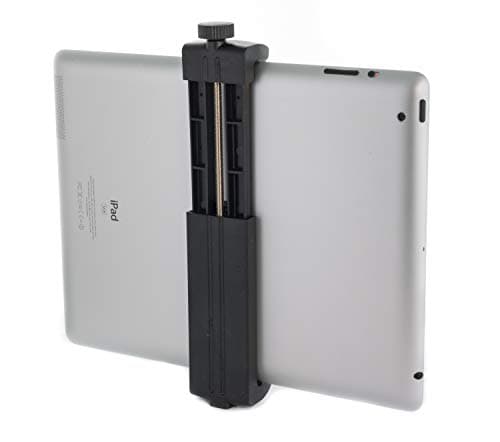
The wrong mount is the number one reason a GameChanger livestream fails mid-game. Not a bad phone. Not a bad app. A $12 clamp on Amazon that looked fine in the living room but vibrates in the wind, slips after the third inning, or drops the phone face-down into the dirt behind the plate.
Good news: a reliable mount costs $30-$60, lasts for years, and comes in three distinct flavors depending on where you want to position it. This guide breaks down the nine mounts most travel ball and rec league parents actually use, organized by rig type so you can pick the right one in 2 minutes.
Disclosure: This article contains affiliate links. If you make a purchase through these links, The Dugout Edge may earn a small commission at no additional cost to you. We only recommend products we believe in and use on our own teams. Thank you for supporting our site!
See also: Best Cameras for GameChanger | GameChanger GoPro Setup Guide | How to Stream Your Kid's Baseball Games | GameChanger Troubleshooting Guide
The Three Mount Types You Will See at Every Field
Every GameChanger mount falls into one of three categories. Pick the category first, then pick the specific product.
1. Fence clamps attach to the chain-link fence behind home plate. Pros: closest angle to the action, stable once locked in, small and light. Cons: requires a chain-link backstop (not all fields have one), can be awkward to angle, and fence-mounted phones pick up vibration when the fence shakes.
2. Tall tripods stand behind the fence, over the fence line, or along the first/third baseline. Pros: work at any field regardless of backstop type, can be repositioned easily, stable in wind. Cons: more expensive, bulky to carry, have to compete with bleacher sightlines.
3. Hybrid tripod-plus-clamp combos bolt a fence clamp onto a tripod head, giving you tripod-style stability plus fence-clamp positioning flexibility. Pros: best of both worlds, works on field or fence. Cons: two pieces to carry and configure.
Below, I break down the best products in each category, plus iPad-specific picks (iPads need different mounts than phones, they are heavier and wider).
Quick Comparison
| # | Product | Price | Best For |
|---|---|---|---|
| 1 | Square Jellyfish Jelly Grip Tripod Mount | $38-$45 | Phone tripod adapter (pair with tripod below) |
| 2 | Pivo Pod Auto-Tracking Holder | $149 | Auto-tracking rig for travel ball serious parents |
| 3 | MyFenceMount Phone/Tablet Fence Clamp | $15-$20 | Best all-around chain-link fence mount |
| 4 | Manfrotto Befree Advanced Tripod | $189-$209 | Best over-the-fence tall tripod |
| 5 | Neewer 70" Photography Tripod | $55-$68 | Budget tall tripod for casual use |
| 6 | Ulanzi MT-08 Mini Tripod | $15-$20 | Dugout shelf or bench position |
| 7 | Game Changer Baseball Fence Mount Kit | $18-$24 | Fence mount with shade + power bank clip |
| 8 | Smatree iPad Tripod Mount | $9-$14 | Attaches iPad to any standard tripod |
| 9 | Anker 10,000 mAh Power Bank | $45-$55 | Pair-with power for any mount setup |
The 9 Best Mounts for GameChanger in 2026
1. Square Jellyfish Jelly Grip Tripod Mount
Our Pick: Best phone-to-tripod adapter on the market
If you already own a tripod (or are about to buy one), this is the adapter that mounts your phone to it. The Square Jellyfish Jelly Grip has a metal construction, spring-loaded jaws that grip phones 2.25-3.5 inches wide (which is every modern phone), and a standard 1/4"-20 threaded hole that fits every tripod ever made.
Why it beats the $8 Amazon knock-offs: metal, not plastic. The plastic versions crack when you tighten them onto a large iPhone. The Square Jellyfish has been the standard in the photography world for over a decade, it is the mount you will see on every YouTuber's shoulder rig. It will not fail.
Pair with any tripod from this guide (tripod-only, no clamp).
Price: $38-$45
2. Pivo Pod Auto-Tracking Phone Holder
Rising Pick: The auto-tracking rig travel ball parents are buying in 2026
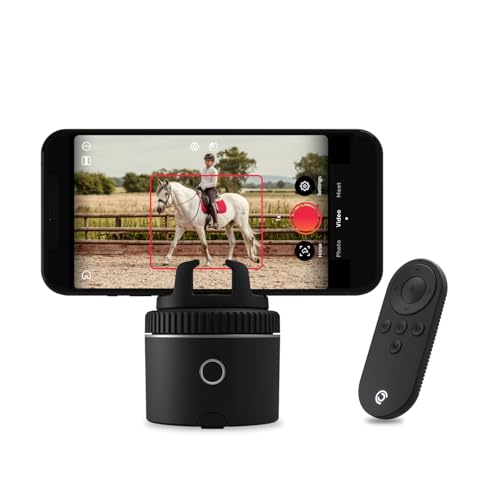
The Pivo Pod is a motorized phone mount that rotates to follow subjects. Pair it with a phone, open the Pivo app, and the mount will (try to) track a player as they move across the field. For baseball, the tracking is imperfect, small ball, too-fast action, but for general framing of where the play is happening, it beats a locked-off stationary mount.
Pivo originally marketed the Pod for equestrian (horse) tracking, which is why the Amazon listing still references horse use, but the tracking technology works for any fast-moving sport including baseball. At around $160 it is one of the more premium mounts on this list, the payoff is in travel ball situations where auto-tracking produces recruiting-grade video parents can share with college coaches.
Downside: it does not clamp to a fence. You need a flat surface, a tripod base, or the Pivo tripod sold separately. For GameChanger-specific use, the Pivo works best as an over-the-fence tripod-mounted camera, not a backstop clamp.
Price: $149-$199
3. MyFenceMount Phone Fence Clamp
Best Fence Clamp: The go-to for chain-link backstop rigs

The MyFenceMount was designed specifically for chain-link baseball and softball backstops. The clamp has rubberized jaws that grip the fence wire without slipping, a ball-head joint that lets you angle the phone down toward the plate, and a cradle that fits phones AND small tablets.
What makes this the best fence clamp: it does not wobble. Generic fence clamps marketed as "phone holders" slip as the fence shakes from foul balls and wind. The MyFenceMount's ratcheting grip locks the clamp on so tight that the mount moves with the fence (not against it), which HyperSmooth-style phone stabilization handles fine.
The ball head is the secret sauce. Cheap mounts have fixed angles; the MyFenceMount lets you dial in the exact tilt for your specific backstop height. Once you set it, it stays.
Price: $15-$20
Shop Fence Phone Mounts on Amazon
4. Manfrotto Befree Advanced Tripod
Our Pick: Best over-the-fence tall tripod

The Befree Advanced is the travel tripod photographers actually carry, and it is the one in this list built to be packed and unpacked a hundred times. Aluminum legs with lever closures that you can open with one hand and gloves on, a folded size that fits in a baseball bag, and a load rating far past what any phone or iPad weighs.
The 494 ball head is the reason to buy Manfrotto over a cheap tripod. It has three independent controls, so you set the tilt for the strike zone once and then pan to follow a runner without the angle drifting. Cheap tripod heads make you reset both every time.
At around $200 this is the most expensive thing on this list by a wide margin, and it is only worth it if you are filming most weekends. Buy it for the decade, not for the season. Cheap tripods fail under the stress of outdoor use, wind, and dirt.
Price: $189-$209
Shop the Befree Advanced on Amazon
5. Neewer 70" Photography Tripod

If the Manfrotto price makes you wince, the Neewer 70" is the budget pick that is honestly good enough for most youth baseball use. 70-inch full extension means it clears the highest backstop fences easily. The pan-and-tilt head is not as precise as the Manfrotto's ball head, but for a tripod you set and leave alone for the whole game, that barely matters.
Weight capacity is 8.8 pounds, which is overkill for a phone (most phones are under half a pound). That headroom is why the Neewer feels rock-solid even in wind, it is massively over-engineered for phone filming.
The main compromise is weight. The Neewer is heavy, about 4 pounds. Hauling it from the parking lot to field 4 at a tournament is a workout. If you value portability, pay up for the Befree Advanced.
Price: $55-$68
6. Ulanzi MT-08 Mini Tripod

For rigs where the camera sits on the dugout shelf, bleacher railing, or a folding table behind the fence, the Ulanzi MT-08 is the mini tripod to buy. Extends to 8 inches, folds to about 6 inches, weighs less than half a pound. Screws into the Square Jellyfish mount above for a complete $35 phone-on-any-surface rig.
This is not your primary mount. It is a backup, a travel-friendly second rig, or a dugout-setup mount for when you cannot access the backstop fence. Every family eventually owns a mini tripod; the Ulanzi is the one worth owning.
Price: $15-$20
7. Game Changer Baseball Fence Phone Mount Kit
Purpose-Built Pick: The only fence mount literally designed for GameChanger streaming

This is the mount I would have picked a year ago if it had existed. It is a chain-link fence clamp with a built-in phone/action-camera holder, a sun shade for the screen (a rare feature on fence mounts), and a clip that holds your power bank against the fence so the cable has zero slack to catch on anything.
It fits an iPhone or a smaller tablet (not a full-size 12.9" iPad Pro), plus action cameras like GoPro or Mevo. At $18 to $24 it costs about the same as a basic phone fence clamp, and the shade and power-bank clip are genuinely useful additions that most parents do not realize they need until the first bright-sun game of the season.
For larger iPads (10.9" and above), pair the Smatree iPad tripod adapter (next on this list) with a tall tripod instead, a dedicated iPad fence clamp is a rare product on Amazon right now, and tripod-mounted iPads are the more reliable setup anyway.
Price: $18-$24
Shop GameChanger Fence Mount on Amazon
8. Smatree iPad Tripod Mount Adapter
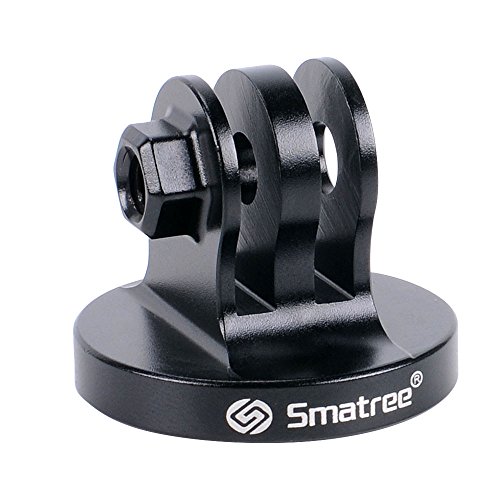
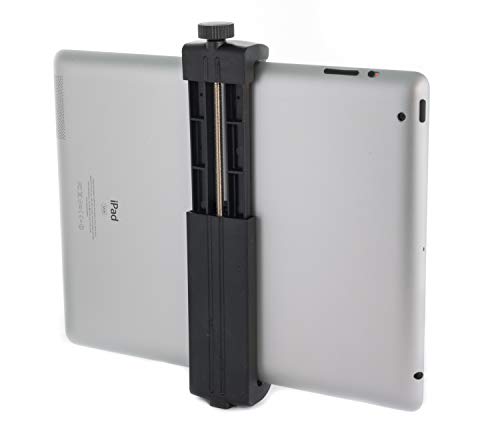
The Smatree is to iPads what the Square Jellyfish is to phones, a universal adapter that mounts an iPad to any standard 1/4"-20 tripod. If you already own a tripod, this is the $25 part that makes your iPad work with it.
Holds iPads 7-11 inches securely. Metal construction, not plastic. The adjustable jaw auto-centers the iPad so the camera lens is correctly positioned.
Pair with the Befree Advanced or Neewer 70" tripod for a complete iPad-on-a-tripod rig. This is the most common travel-ball setup at every complex.
Price: $9-$14
Shop Smatree iPad Adapter on Amazon
9. Anker 10,000 mAh Power Bank (Pair-With)
You are not buying a mount without the power bank that keeps your phone or iPad alive during the game. Full stop. A phone on any mount, running GameChanger with the screen on for 2-3 hours, will die by the fifth inning without external power.
The Anker 10,000 mAh is the right size: enough capacity to charge an iPhone twice or an iPad once, with USB-C PD (power delivery) output fast enough to out-charge the device's consumption rate. Cheap no-name power banks trickle-charge, your device will still die.
This is a must-have, not a nice-to-have. Every mount rig in this guide assumes you have a power bank in the setup.
Price: $45-$55
Shop Anker Power Bank on Amazon
How to Pick Your Mount by Rig Type
Skip the spec sheet. Pick your rig in 30 seconds.
Rig Type A: "I am parking behind the backstop and clamping to the fence." Buy: the Game Changer Baseball Fence Mount Kit (phones + small tablets) or, for a standard phone, the FPN Fence Phone Mount. One purchase, you are done.
Rig Type B: "I want a tall tripod I can position anywhere." Buy: Manfrotto Befree Advanced Tripod (premium) or Neewer 70" Tripod (budget) + Square Jellyfish Jelly Grip (phone) OR Smatree iPad Adapter (iPad).
Rig Type C: "I want auto-tracking for recruiting/highlight footage." Buy: Pivo Pod auto-tracking phone holder. Pair with your own tripod.
Rig Type D: "I shoot from the dugout shelf or bleacher railing." Buy: Ulanzi MT-08 Mini Tripod + Square Jellyfish Jelly Grip. This combo totals about $35 and fits in a pocket.
Whatever rig you pick, also buy the Anker 10,000 mAh Power Bank. Non-negotiable.
Mistakes to Avoid When Buying a Mount
Mistake 1: Buying the cheapest Amazon phone mount. The $8-$12 mounts with 4.3-star ratings are fine for a selfie at a concert. They are not fine for 2+ hours of wind, foul-ball vibration, and a $1,000 iPhone hanging off the backstop. Spend $30-$50. This is not the line item to save money on.
Mistake 2: Using a phone mount for an iPad. iPads are too wide, too heavy, and put too much leverage on a phone-grade clamp. Eventually the clamp works loose and the iPad falls. Buy an iPad-specific mount.
Mistake 3: Ignoring the power bank. The cheapest mount on the market will never drop your stream. A dead phone will. Spend $25-$35 on an Anker.
Mistake 4: Forgetting to test the rig at home before the first game. Every new mount has a learning curve. Set it up in your backyard, clamp it to a chain-link fence if you have one, run a test GameChanger broadcast, and make sure the angle, stability, and power-pass-through all work. Do not debug this for the first time while parents are waiting for the stream to start.
Frequently Asked Questions
What is the best phone mount for GameChanger?
For most users, the MyFenceMount phone fence clamp is the best all-around GameChanger mount. It attaches directly to a chain-link backstop, grips securely, and has an adjustable ball-head joint to dial in the angle. At $35-$50 it is the right price-to-quality balance for a mount that will be used every weekend for years.
Can I mount an iPad to a baseball backstop?
Yes, but you need an iPad-specific setup, not a phone mount. For small iPads (7-9 inches), the Game Changer Baseball Fence Mount Kit works. For full-size iPads (10.9" 10th gen and above), pair the Smatree iPad Tripod Mount Adapter with a tall tripod behind the fence, that is the more stable setup. Avoid using a phone-specific clamp for an iPad; the weight and width will eventually work the clamp loose.
What size tripod do I need for GameChanger?
A 60-70 inch extendable tripod is the sweet spot for most youth baseball backstops. Shorter tripods (under 50 inches) cannot clear the backstop fence to give you a clean camera angle. The Manfrotto Befree Advanced and the Neewer 70" are both popular picks.
Does Pivo Pod work with GameChanger?
Yes. The Pivo Pod mounts any smartphone and rotates to track subjects. GameChanger does not integrate with Pivo directly, the Pivo is acting as a motorized mount for your phone, and GameChanger runs on the phone as usual. The tracking is imperfect for baseball (the ball is too small), but it produces smoother, more watchable video than a locked-off mount.
Do I need a separate mount for my camera and my phone?
If you use a phone as both camera and scorekeeper, you need one mount for the phone (which is livestreaming) and probably a second device (phone or iPad) in-hand for scoring. Trying to score on the same device that is mounted and broadcasting is awkward, you have to reach up and tap the mounted screen every pitch. Most experienced families split it: one device on the mount (camera), one device in hand (scoring).
What is the cheapest reliable GameChanger mount setup?
A working rig for under $60: Ulanzi MT-08 mini tripod ($20) + Square Jellyfish Jelly Grip ($15) + Anker 10,000 mAh power bank ($25). Place the mini tripod on the dugout shelf, bleacher railing, or a folding table. It will not beat a backstop-fence rig for angle, but it is reliable and portable.
Will a fence clamp fit every baseball backstop?
Fence clamps work on chain-link backstops, which is what 90%+ of youth baseball fields have. If your field has a solid padded backstop or a netting-style backdrop, a fence clamp will not work, you need a tall tripod behind the fence instead. Check your specific field before buying a fence-specific mount.
How do I stop my phone from vibrating on the mount?
Three fixes, in order of impact: (1) tighten the mount jaws fully, a loose mount is the usual culprit; (2) enable the phone's camera stabilization (on iPhone: Settings → Camera → Enhanced Stabilization); (3) use a shorter tripod or mount the clamp closer to the fence post (less leverage means less shake). If wind is the issue, consider switching to a GoPro, which has much better built-in stabilization.
Ready to Mount Up?
Pick the rig type from the decision matrix above, grab one of the mounts plus the power bank, and you have a rock-solid GameChanger broadcast setup that will last years.
For the camera side of the equation, see our complete camera comparison, iPhone, iPad, and GoPro setups compared. And when your rig is ready, the how to stream your kid's baseball games article walks through GameChanger livestream, YouTube Live, and Facebook Live so you can pick the right broadcasting destination.
If anything goes sideways at the field, the GameChanger troubleshooting guide covers the 12 most common mid-game problems and their fixes.
Tags
Score Your Next Game Free
Game Day scores live from your phone: runs, outs, baserunners, pitch counts. Free, in your browser, no account needed to start.
Try the Free Scoring App