Best Cameras for GameChanger in 2026: GoPro, Action Cam, and Phone Setups Compared
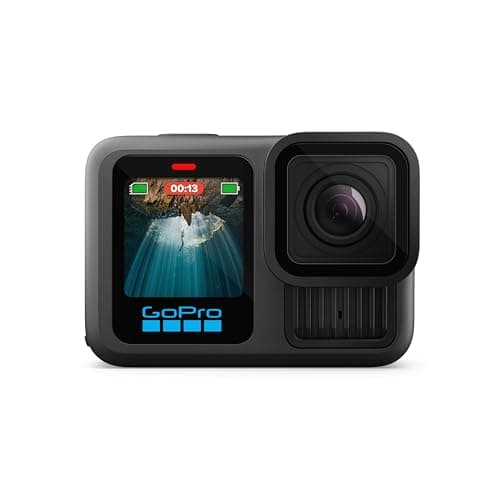
If you have been streaming youth baseball games on GameChanger with a phone propped on the backstop, you already know the problems: thermal shutdowns in July, battery dead by the fifth inning, and a stream that cuts out every time the wind shakes your tripod. That is why parents are switching to dedicated cameras. Searches for GoPro + GameChanger are up over 700% this year, and for good reason.
A dedicated action camera mounted on the backstop produces a better, more reliable stream than any phone. Better thermal handling, better battery life, better wide-angle coverage, and you keep your phone free for scoring or texting. You still need a phone in the rig, iPhone or Android, to start the stream from the GameChanger app and usually to supply the hotspot. But the camera doing the actual recording and streaming work should be purpose-built for it.
This guide compares the best dedicated cameras for GameChanger in 2026, starting with the action cameras that are dominating travel ball complexes, followed by phone and tablet options for parents who want to use what they already own. Every recommendation includes honest pros and cons, a realistic price range, and the exact rig pieces you need to make it work.
Disclosure: This article contains affiliate links. If you make a purchase through these links, The Dugout Edge may earn a small commission at no additional cost to you. We only recommend products we believe in and use on our own teams. Thank you for supporting our site!
See also: Best Phone Mounts for GameChanger | GameChanger GoPro Setup Guide | How to Stream Your Kid's Baseball Games | Best Baseball Scorekeeping Apps
What to Look For in a GameChanger Camera
Before you buy anything, know this: GameChanger streams from both iPhone and Android, either from the phone's own camera or from an external camera like a GoPro. The app needs iOS 17 or Android 11 or newer, and it caps external cameras at 1080p. Those two facts narrow the device list more than any spec sheet.
Here is what actually matters when you are picking a camera:
- App compatibility. GameChanger runs on iOS 17 or newer and Android 11 or newer, and both can broadcast. External cameras connect through their maker's app (GoPro Quik for a GoPro) and stream at up to 1080p. Set anything higher and GameChanger will not broadcast it.
- Battery life under load. Livestreaming video, running GameChanger scoring, and keeping the screen on for 2+ hours will drain even a flagship iPhone in under 90 minutes without external power. Plan for a 10,000 mAh power bank minimum.
- Screen visibility in sunlight. A 3:30 PM game in July on an east-facing field is a nightmare for any phone screen. Newer phones and tablets with brighter screens handle this better than older devices.
- Zoom quality. GameChanger streams are shared with parents watching on phones. A wide shot from behind the backstop means every player looks small. A camera with optical zoom or a wide-sensor crop (like the iPhone Pro models) makes the stream watchable from the bleachers perspective.
- Mounting options. Does the device fit a standard phone mount? Can it take a tripod adapter? GoPros come with native mounting; iPads need bigger, heavier mounts than phones and not every fence clamp will hold one.
- Heat handling. Phones in direct sun during a summer doubleheader will thermal throttle and drop the stream. This is the #1 reason broadcasts cut out mid-game, and it is the single biggest reason to use a dedicated action camera if you live somewhere hot.
Every product below is rated on these criteria, not on what Apple or GoPro's marketing says.
Quick Comparison
| # | Camera / Device | Price Range | Best For |
|---|---|---|---|
| 1 | GoPro Hero 13 Black | $399-$449 | Best overall pick for dedicated streaming |
| 2 | GoPro Hero 12 Black | $299-$349 | Budget action cam that still works great |
| 3 | Insta360 Ace Pro 2 | $379-$429 | Recording night games (does not livestream) |
| 4 | Google Pixel 8 / Samsung Galaxy S24 | $250-$290 renewed | Android families who want to stream |
| 5 | iPhone SE (3rd gen) | $129-$175 renewed | Cheapest dedicated streaming phone |
| 6 | iPad (10th gen) | $349-$449 | Team tablet for scoring + streaming combo |
| 7 | iPhone 15 Pro Max | $620-$715 renewed | Use-your-daily-phone option |
Prices reflect typical street price as of early 2026. Amazon listings fluctuate; check current pricing at each link.
The 7 Best Cameras for GameChanger in 2026
1. GoPro Hero 13 Black
Our Pick: Best dedicated camera for GameChanger streaming

This is the camera parents are switching to, and the numbers tell the story: GoPro + GameChanger searches are up over 700% this year. A GoPro clamped to the backstop produces a better stream than any phone on a tripod 20 feet back, and the Hero 13 Black is built for this exact use case. Native 5.3K recording, HyperSmooth stabilization that kills the jitter from a windy fence, and an ND-filter-friendly lens mount that solves the afternoon-sun blowout problem a phone cannot touch.
The Hero 13's biggest upgrade is dual battery support via the new Enduro batteries. Two Enduro batteries can realistically take you through a 3-hour doubleheader at 4K without a recharge. Phone-based rigs die around inning 5. GoPros also shrug off heat. Running a GoPro at 95 degrees in the sun for two hours does not thermal throttle it the way a phone will. If you live somewhere hot (and if you play summer ball, you do), this alone is worth the switch.
How it connects: in GameChanger you tap Record Video, choose External Camera, then tap GoPro, which hands you to the GoPro Quik app on your iPhone or Android. Pick the network, set 1080p, tap Go Live, and the GoPro streams to GameChanger itself. The phone only starts it and usually supplies the hotspot. Stop the stream from Quik, not GameChanger. It takes a few minutes the first time and runs itself after that. Our GoPro setup guide walks through the full rig.
If you are a "set the camera on the fence and walk away" kind of parent, this is the one. Upload the raw footage to YouTube or your team's shared drive post-game for families who want to rewatch.
Price: $399-$449
2. GoPro Hero 12 Black
Best Value: 90% of the Hero 13 at a lower price

The Hero 12 Black is the budget-minded GoPro pick and a legitimately great camera for this use case. You get 5.3K video, HyperSmooth 6.0, and the same mount compatibility as the Hero 13. The main differences from the 13 are no dual-battery support (you have to swap a single battery mid-doubleheader) and slightly weaker low-light performance.
For a weekend-warrior parent who streams maybe once a week and has dry eyes about spec sheets, the Hero 12 at $299-$349 is the smarter buy. It pairs with exactly the same accessory ecosystem, so the fence clamps, ND filters, and battery chargers you buy for it carry over if you eventually upgrade.
Note that GoPro retires generations fast. If you are reading this after late 2026, the Hero 12 may be out of stock on Amazon and your cheaper option becomes the used market on eBay or Facebook Marketplace. The Hero 11 Black is also perfectly fine for GameChanger if you find one for under $250.
Price: $299-$349
3. Insta360 Ace Pro 2
Sleeper Pick: Best for recording night games (it does not livestream)
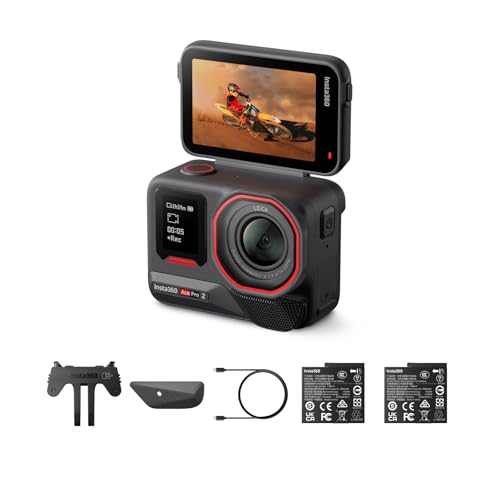
The Insta360 Ace Pro 2 is the most underrated camera in the GameChanger space. It matches the GoPro's 4K/120fps recording, adds a flip-up screen that makes aiming at the field dramatically easier than a GoPro (you can actually see what you are framing from behind the camera), and includes Leica-engineered optics that handle low-evening-light better than any action camera at its price.
The AI tracking feature is the interesting one. Point it at the field, enable subject tracking, and the camera will (sort of) keep up with fast-moving action. It is not flawless for baseball, the ball is too small and moves too fast for consistent tracking, but for general game framing it beats a locked-off GoPro.
The reason it is not higher on this list: the Ace Pro 2 does not livestream. Insta360 says so in its own support FAQ. It records, and it records night games better than a GoPro, but it cannot send a live feed to GameChanger or anywhere else. Buy it if your families want a clean replay posted after the game. If the game has to go out live, go GoPro.
Price: $379-$429
4. Google Pixel 8 / Samsung Galaxy S24 (Android Option)
Android Pick: GameChanger streams from Android, including 1080p on phones that can handle it.
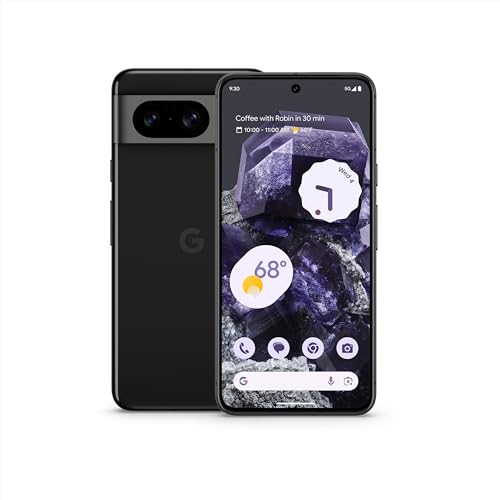
This pick is for Android-first families, and there is no longer a reason to switch to an iPhone for GameChanger. The app runs on Android 11 or newer and broadcasts from the phone's own camera. GameChanger offers 1080p on phones with the processing power for it; if the 1080p option does not appear during setup, your phone is one of the older ones capped at 720p. The Pixel 8 and Galaxy S24 both have an ultra-wide lens, which GameChanger can use for a wider view of the field.
Want a GoPro rig instead? It works from Android the same way it works from an iPhone: GoPro Quik runs on Android, so the phone you already own starts the stream and your GoPro does the camera work.
The Pixel 8's camera is arguably better than the iPhone 15 non-Pro for still photography, which matters if you want post-game pictures. For streaming, the difference between a recent iPhone and a recent Android phone is small. Pick the one your family already knows.
Price: $699-$799 new / $250-$290 renewed
Already Own an iPhone or iPad? You Can Use It Too
If you are not ready to buy a dedicated camera, you can absolutely stream GameChanger from the iPhone or iPad you already own. These are not the best cameras for the job, but they work, and upgrading to a GoPro later is always an option.
5. iPhone SE (3rd Generation)

The iPhone SE (3rd gen) is the cheapest way to add a reliable dedicated streaming phone to the bag. Apple no longer sells it new, so renewed and used units are the buy, and at that price you get an A15 Bionic chip (fast enough to run GameChanger cleanly), support for the iOS 17 GameChanger requires, and a 12 MP camera that produces a perfectly watchable stream.
Most parents use the SE as a dedicated streaming phone: mount it on the backstop running the broadcast, and score on a second phone or iPad signed into the same GameChanger account (GameChanger allows two devices at once). A cheap used Android phone on Android 11 or newer does the same job.
The screen is small at 4.7 inches, which makes scoring on the same device a chore. Skip the SE if you want the camera to be your only device.
Price: $129-$175 renewed
6. iPad (10th Generation): or iPad Mini 6

The iPad is a common sight in travel ball dugouts, mostly as the scoring device: the big screen shows the scoring interface, the pitch count, and the batting order at once, where a phone feels cramped by the top of the fourth inning. For baseball and softball, GameChanger does not stream and score from the same device (its one-device Stream and Score covers sports like basketball and soccer), so the usual setup is the iPad scoring in hand while a phone or GoPro on the fence streams, both signed into the same account.
The iPad 10th generation at $349-$449 is the sweet spot. You get the 12 MP rear camera, USB-C charging so you can power it off a standard power bank all game long, and a 10.9-inch screen visible in direct sunlight. The iPad Mini 6 is a great alternative if you want something lighter and more portable.
Where the iPad falls short compared to dedicated cameras: no optical zoom (every player looks small from the backstop), heavier so it needs a beefier mount, and it thermal throttles in direct summer sun. If you already own one, use it. If you are buying specifically to stream, a GoPro Hero 12 started from the phone you already have is a better investment at the same price point.
Price: $349-$449 (10th gen) / $499-$649 (Mini 6)
7. iPhone 15 Pro Max

If you are going to use your daily-driver phone as your GameChanger camera, the iPhone 15 Pro Max is as good as it gets. Apple has discontinued it, so every listing now is a renewed unit, which is the only reason the price below is what it is. The 48 MP main sensor captures enough detail that GameChanger's downscale to streaming resolution still looks crisp. GameChanger lets you switch lenses mid-stream, ultra-wide, standard, and on some iPhones a 2x telephoto, and that zoom is the one thing a phone has over an action camera: GameChanger cannot zoom a GoPro.
The downside is obvious: this is a $999-$1,199 phone that you carry everywhere, not a dedicated baseball camera. You are tying up your personal phone for 2-3 hours every game. It thermal throttles in summer heat faster than a GoPro. And if a foul ball hits the fence while your Pro Max is clamped to it, that is a very expensive fix.
If you already own a 15 Pro Max, it works fine for streaming. If you are buying specifically for GameChanger, put that money toward a GoPro Hero 13 ($429) and start it from the phone you already carry. Better heat handling, and your personal phone stays in your pocket instead of on the fence.
Price: $999-$1,199 new / $620-$715 renewed
How to Pick the Right Camera for Your Setup
Skip the spec sheet, answer these four questions, and you will land on the right camera within five minutes.
1. You want the best stream quality and the most reliable rig. Get the GoPro Hero 13 Black and clamp it to the backstop fence, then start the stream from the phone you already own, iPhone or Android. This is the setup travel ball parents are moving to in 2026 because it handles heat, lasts all day on battery, and produces a wide-angle stream that looks better than any phone. Total cost with a good fence clamp: about $450 to $500.
2. You want a great camera but are watching your budget. Get the GoPro Hero 12 Black at $299-$349. Same mount ecosystem, same Quik setup, 90% of the Hero 13's quality. Add a fence clamp and you are streaming reliably for about $350 to $400.
3. You mostly want night-game footage to post after the game, not a live stream. Get the Insta360 Ace Pro 2. The Leica optics and larger sensor handle dusk and games under the lights better than any GoPro, and the flip-up screen makes aiming easier. It does not livestream, so if the game has to go out live, get a GoPro instead.
4. You already own a phone or tablet and do not want to buy another device. Use what you have. Any iPhone on iOS 17 or newer, or any Android phone on Android 11 or newer, can stream to GameChanger. If you also want to score, do it on a second device signed into the same account, an iPad 10th gen being the comfortable choice. Know that you are tying up a phone on the fence for the whole game and it will thermal-throttle in summer heat. Plan to upgrade to a dedicated camera once the phone-on-the-fence approach starts frustrating you.
Best Camera for Live Streaming Baseball and Softball Games
Not every league runs on GameChanger. If you want to stream a baseball or softball game to YouTube, Facebook, or a private link, the pick is the same: the GoPro Hero 13 Black on the backstop. Through the GoPro Quik app it streams to GameChanger, YouTube, Facebook, Twitch, or any RTMP link at up to 1080p, and on a GameChanger stream it can save a copy to the SD card at the same time as a backup.
Three things decide whether the stream survives the whole game:
- Upload speed, not bars. Run a speed test at the field and read the upload number, not the download. This is GameChanger's own guidance for external cameras:
| Upload speed at the field | Stream at | Data per hour |
|---|---|---|
| 7 Mbps or more | 1080p | 2 to 4 GB |
| 4 to 7 Mbps | 720p | 1.2 to 2.7 GB |
| 2 to 4 Mbps | 480p | 450 to 900 MB |
| Under 2 Mbps | Record only and post it after | None |
- A hotspot close to the camera. A phone's personal hotspot has limited range. A dedicated hotspot near the backstop holds the connection when the phone goes back to the bleachers with you.
- Room on the SD card. If the card fills up during a GameChanger stream, the recording stops and the stream cuts off with it.
The rig is identical for softball. The one camera on this list that cannot do any of this is the Insta360 Ace Pro 2, which records but does not livestream. Streaming to YouTube for the first time? Turn on live streaming for the channel a day early, because YouTube can take up to 24 hours to switch it on.
What About the Official GameChanger Streaming Kit?
GameChanger's Streaming Kit, sold through Dick's Sporting Goods, is a carry case, an adjustable mount, and a tripod that turn a phone or compatible camera into a streaming setup. It does not include a camera. It is a reasonable buy if you want the pieces GameChanger itself tested and would rather not shop for a mount.
If you already own a solid fence mount or tripod, you do not need it. The camera is the part that decides how the stream looks, and the kit leaves that to you.
Accessories Every GameChanger Camera Setup Needs
Whatever camera you end up with, these accessories turn a flaky rig into a rock-solid one:
- A 10,000+ mAh USB-C power bank. Anker and Mophie both make good ones. Do not cheap out, a $15 no-name power bank that trickle-charges will keep your phone at 30% all game, which is worse than running on internal battery.
- A proper fence mount or tall tripod. A $12 clamp on Amazon will vibrate, slip, and fall. Pay $30-$60 for one that will not. Our phone mount guide breaks down the three rig types.
- A dedicated mobile hotspot for a GoPro rig. GameChanger notes that a phone's personal hotspot has limited range from the camera and recommends a dedicated hotspot, especially when the phone that started the stream is in your pocket in the stands.
- A rain cover. A $10 clear plastic cover that fits over the camera and mount saves you from having to cancel a stream the moment a summer shower rolls through. Most coaches do not own one; the ones who do look smug in May.
Frequently Asked Questions
What is the best camera for GameChanger?
The best camera for GameChanger in 2026 is the GoPro Hero 13 Black mounted on the backstop fence and started from the phone you already own. It handles heat better than any phone, lasts through doubleheaders on dual Enduro batteries, and the wide-angle HyperSmooth footage produces a stream parents actually enjoy watching. For a budget option, the GoPro Hero 12 Black delivers 90% of the quality at $100 less. If you do not want to buy a dedicated camera, an iPad 10th gen or iPhone 15 Pro will work, but expect thermal throttling in summer and shorter battery life.
Does GameChanger work with Android phones?
Yes, fully. The GameChanger app runs on Android 11 or newer and can score, watch, and broadcast. Android phones stream from their own camera, with 1080p on phones that can handle it, and they can start a GoPro stream through the Android version of GoPro Quik.
Do I need the GameChanger Streaming Kit?
No. The Streaming Kit is accessories: a carry case, an adjustable mount, and a tripod, with no camera. Any iPhone on iOS 17 or newer or Android phone on Android 11 or newer can stream on its own. The kit is worth it only if you want a tested mount and tripod in one box.
Can I use a GoPro with GameChanger?
Yes, directly. GameChanger supports the GoPro Hero 7 Black through the Hero 13, plus the GoPro Max. Start in GameChanger (Record Video, External Camera, GoPro), finish setup in GoPro Quik on your iPhone or Android, and the camera streams at up to 1080p. End the stream from Quik. See our GoPro setup guide for the exact steps.
What is the best budget camera for GameChanger?
The GoPro Hero 12 Black at $299-$349 is the best budget dedicated camera. Start it from the phone you already own and you have a complete rig for about $350 to $400 with a fence clamp, one that outperforms any phone-only setup. If you only want to spend $150 to $250 total, a renewed iPhone SE 3rd generation, or a used Android phone on Android 11 or newer, can live in the baseball bag as a dedicated streaming phone.
Will my old iPhone work with GameChanger?
Only if it runs iOS 17 or newer, which GameChanger now requires. That means an iPhone XS, XR, or 2nd generation SE at the oldest. Older phones that do qualify may not get the 1080p option, since GameChanger limits phones without the processing power for it to 720p, and they will struggle more with heat and battery during long games.
How much should I spend on a GameChanger camera setup?
If you already own a phone on iOS 17 or Android 11 or newer, your cost is just a mount ($30-$60) and a power bank ($25-$40). A dedicated streaming phone adds $150 to $250 (a renewed iPhone SE or a used Android). A GoPro rig runs about $350 to $500 (a Hero 12 or 13 plus a fence clamp), or more with Enduro batteries and a dedicated hotspot. The sweet spot for most families is the GoPro rig started from the phone they already carry.
What camera do travel ball teams use for GameChanger?
At travel ball complexes in 2026, the most common setups are (1) a team-owned iPad 10th gen mounted on a tall tripod behind home plate, (2) a coach's iPhone 14/15 Pro clamped to the backstop, and increasingly (3) a GoPro clamped to the fence streaming through GoPro Quik. The GoPro rig is growing fast, driven by parents tired of thermal shutdowns and dead batteries mid-game. If you are building a rig from scratch in 2026, the GoPro setup is the one to copy.
Ready to Build Your Rig?
A camera is half the equation. The mount is the other half, and the wrong mount is the single most common reason a GameChanger stream fails mid-game (slipping, vibrating, falling onto the dirt behind the backstop). Before you buy any of the cameras above, read our complete phone mounts guide to make sure you pick a fence clamp or tripod that actually holds your specific device.
And if you are going the GoPro route, the GameChanger GoPro setup guide walks through the setup step by step.
Once your rig is dialed in, the how to stream your kid's baseball games article compares GameChanger's livestream to alternatives (YouTube Live, Facebook Live, direct-to-family) so you can pick the right streaming destination for your team.
Tags
Score Your Next Game Free
Game Day scores live from your phone: runs, outs, baserunners, pitch counts. Free, in your browser, no account needed to start.
Try the Free Scoring App