How to Use Arm Care in Dugout Edge
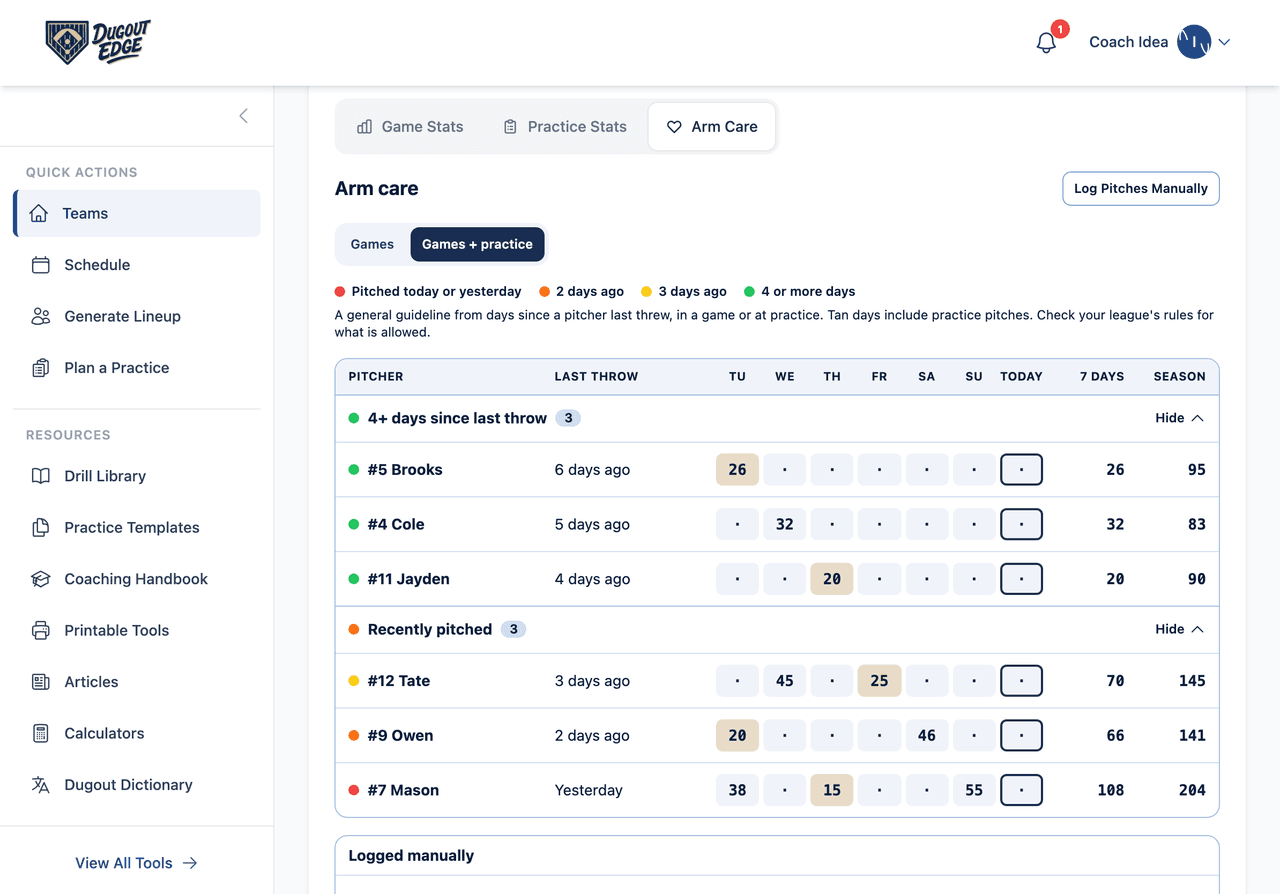
It is Thursday. You have a game tonight and you need a pitcher. Who threw on Tuesday, and was it 40 pitches or 60? Did anyone throw a bullpen yesterday? And didn't one of your kids pitch for a travel team over the weekend?
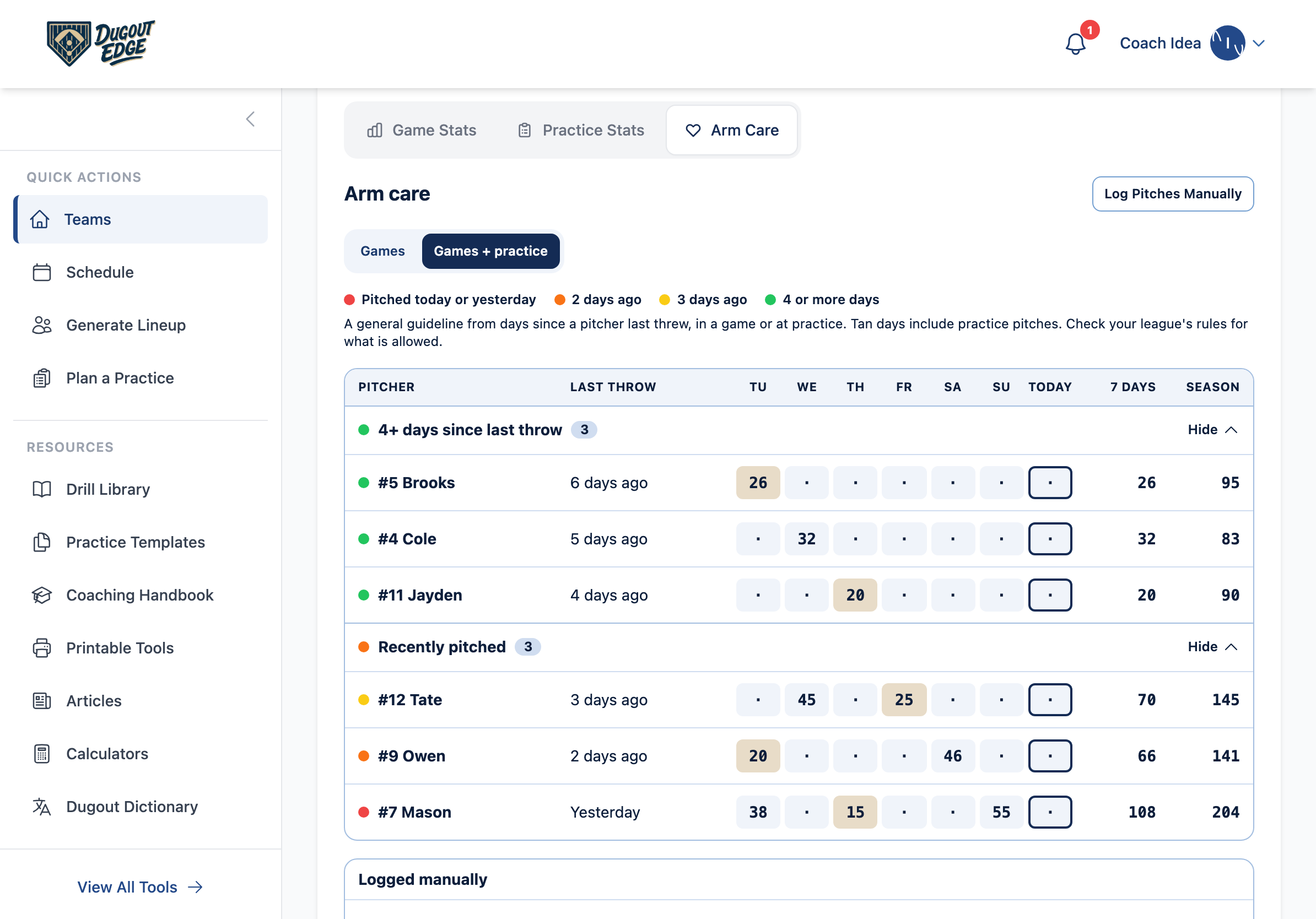
Arm Care answers all of that on one screen. It is not one more thing to fill in. You already count pitches in the Game Day tool and chart bullpens in Practice Day. Arm Care adds it up for every pitcher on your team: when each one last threw, how many pitches over the last 7 days, and how many this season.
Arm Care keeps the record. Your league's rules still decide. Pitch counts and rest days are rules in Little League and most sanctioned youth leagues, not suggestions. The colors in Arm Care are a general guide from how many days ago a pitcher last threw. They do not know your league's pitch limits or rest days yet. That is coming. Until then, check the record here against your league's rules.
Where to find it
- Open Teams in the menu and pick your team.
- Tap the Stats tab.
- Tap Arm Care, next to Game Stats and Practice Stats.
Arm Care is for coaches only. The parent portal shows game and practice stats, never Arm Care.
How pitches get in
You never enter anything twice. Pitches reach Arm Care three ways.
- Count them in Game Day. Every pitch you count in the Game Day tool goes against whoever is on the mound, in Basic mode or with stat tracking on. A pitching change moves the count to the new pitcher.
- Chart a bullpen in Practice Day. Tap Bullpen in the bar at the bottom of Practice Day and chart the pen pitch by pitch, or just count it. The pen is saved on that practice's date. If you charted pens on the free pitching chart before you signed up, Keep pens brings them into your team.
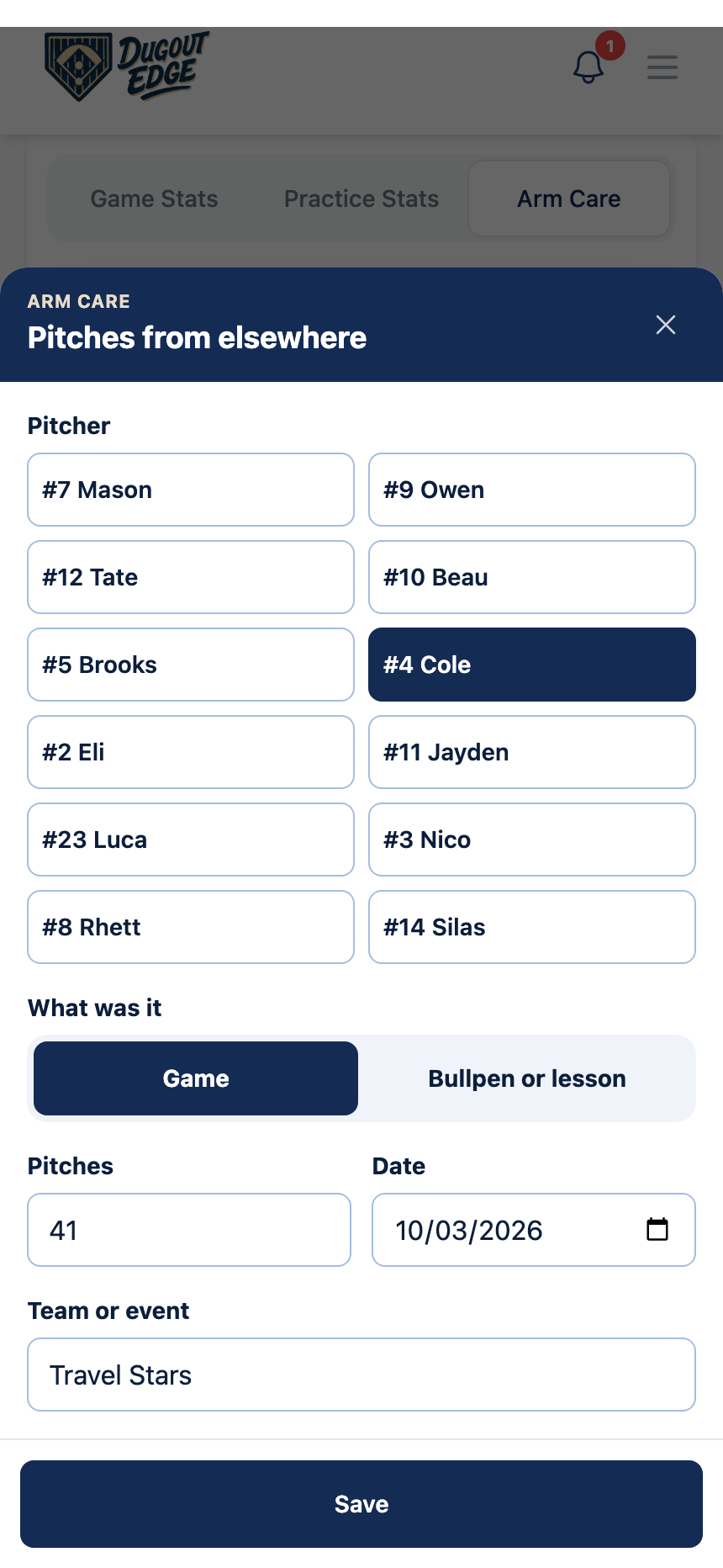
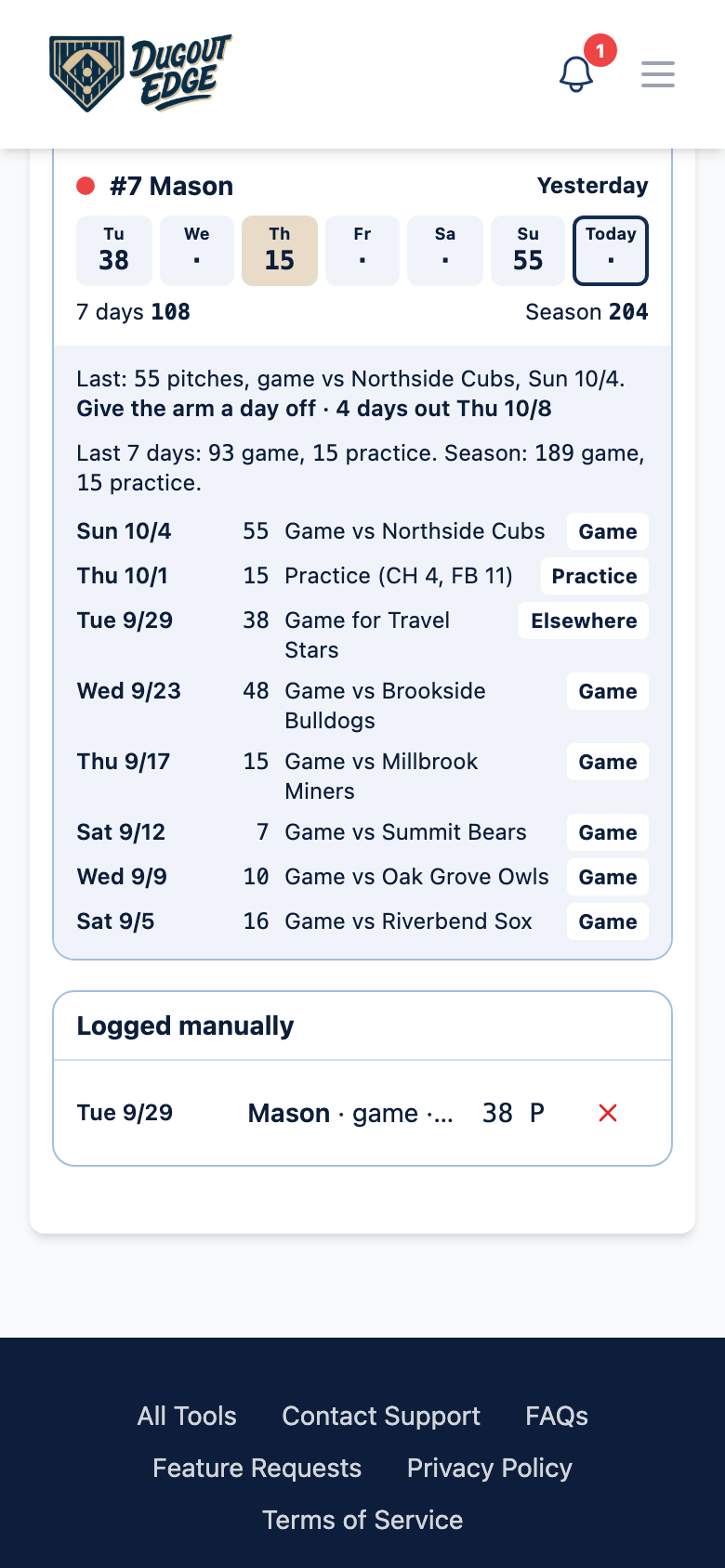
- Log them yourself. For anything Dugout Edge did not see: a travel ball game, a pitching lesson, or a game you scored somewhere else. Tap Log Pitches Manually, pick the player, choose Game or Bullpen or lesson, enter the pitches, the date, and the team or event, then tap Save. Your entries are listed under Logged manually, and the X next to one deletes it.
How to read it
Games or Games + practice. The switch at the top picks which pitches Arm Care looks at. Games shows game pitches only, which is what league pitch counts are about. Games + practice adds bullpens and lessons. Bullpen pitches are not part of an official pitch count, but they still tire the arm, so this is the view that shows everything a kid has thrown. Arm Care remembers which one you picked.
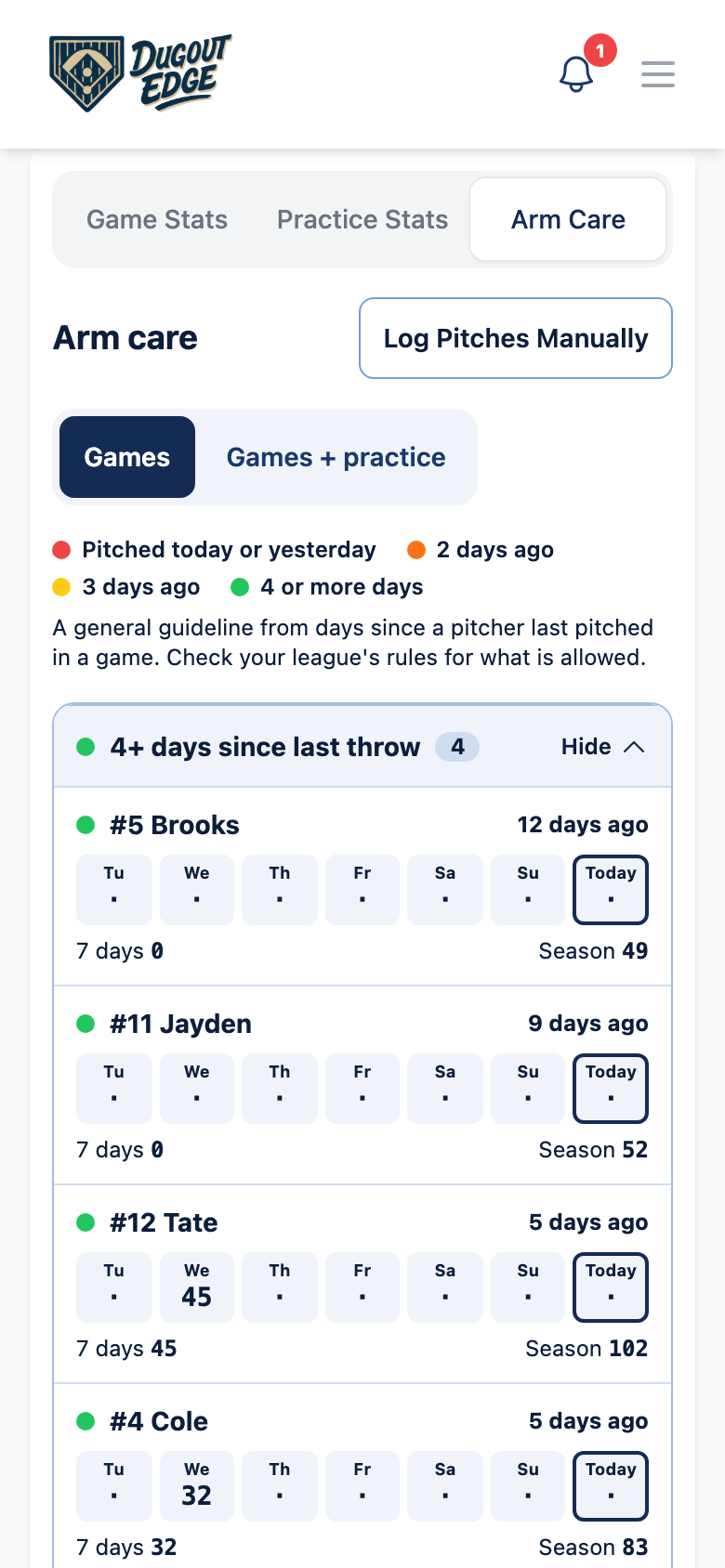
The color dot. Each pitcher gets one dot, from how many days ago they last threw:
- Red: pitched today or yesterday. Give the arm a day off.
- Orange: pitched 2 days ago.
- Yellow: pitched 3 days ago.
- Green: 4 or more days since the last throw.
That is all the dot knows. It never says a pitcher can or cannot pitch, because that depends on how many pitches they threw and on your league's rules.
The groups. Pitchers 4 or more days out sit at the top. Recently pitched comes next, with the closest to rested first. Players with no pitches yet are folded away at the bottom. Tap a group's header to fold or open it.
Each row. The pitcher, when they last threw, seven boxes for the last seven days with the pitches thrown each day, then the 7-day total and the season total. Today's box is outlined. In Games + practice, a tan box means the day included practice pitches. On a phone the boxes sit under the name.
Tap a pitcher to see their recent outings: the date, the pitches, who it was against or what it was, and a tag that says Game, Practice, or Elsewhere. The line above them says when the dot turns green.
Where else you will see it
Arm Care reads the same record as the rest of the app, so every screen agrees.
- Game Day. When you change pitchers, each name in the list shows when they last threw and their last outing. If the pitcher on the mound threw yesterday, the pitch count card says so.
- Lineup generator. If the lineup puts a kid on the mound who threw yesterday or earlier the same day, a Recently pitched note says so above the lineup. It never moves anyone for you.
- Practice Day. A pitching block lists any pitcher on it who threw today or yesterday.
- Bullpen chart. Picking a pitcher shows their last 7 days, games and bullpens together.
Coming soon
- Custom league rules. Set your league's pitch limits and rest days, and Arm Care will use them in place of the general guide.
- Import from GameChanger. Bring in pitch counts from games scored in GameChanger. Until then, Log Pitches Manually takes a few seconds a game.
Quick tips
- Log outside pitches the day they happen. Travel ball and lessons are the pitches that sneak up on you.
- Ask on Monday. A kid who pitched for another team over the weekend will not always mention it. A quick question to the parents keeps the record honest.
- Check Games before a game, Games + practice before a bullpen. The first is what your league counts. The second is what the arm feels.
- Pain ends the day. If a pitcher says the arm hurts, that pitcher is done throwing for the day, whatever color the dot is.
More help
- How to use the Game Day tool, where most pitch counts come from
- How to use Practice Day, for bullpens at practice
- Pitch count rules by age for Little League, USSSA, and travel ball
- The FAQ page for account and membership questions
Tags
Track Pitch Counts in Real Time
Count pitches from your phone during the game, see days since each pitcher last threw, and know who is rested before you hand over the ball.
Open the Pitch Count Tracker