Tracking Player Stats in Game Day
What Stat Tracking records, how to run it, and where the numbers end up
You already build a lineup before the game. Game Day is what runs it once the game starts: the same batting order and the same inning-by-inning positions, live, with the stats kept as you go.
The Game Day tool has two modes, and you pick one when you set up the game. They are built for two different jobs, and plenty of teams run both at once.
Basic is a dugout board. It shows every player where they are playing each inning, holds the score and the outs, counts pitches, and takes notes. Every number on it is yours to tap. It is what you prop up where the team can see it.
Stat Tracking is a scorebook. It records each at-bat as it happens, where the ball went and how it was hit, so the game ends with a real box score and the numbers roll into your season. It is the one to hand a parent in the bleachers while the dugout keeps the board.
Nothing about Stat Tracking asks you to know notation. You tap what happened in plain words and the tool does the bookkeeping.
Where this fits: the lineup is the plan, Game Day runs it
Game Day is the second half of something you have probably already done. The lineup generator builds the plan before the game: who bats in what order, and who plays where each inning. Game Day opens that plan on Saturday and runs it live.
That is why the board already knows your batting order and your field positions the moment it loads. You are not setting anything up again. You are picking up the lineup you built and playing the game with it.
- •The plan says Silas plays shortstop in the third. Game Day puts him there, and tracks that he actually did.
- •Move a player mid-game and the board follows from that inning forward. What each kid actually played is what counts toward playing time, not what you planned.
- •Pitches count themselves for whoever is on the mound, and the count follows a pitching change.
- •With Stat Tracking on, every at-bat is recorded too, so the game ends with a box score instead of just a final score.
How to get there
Three things have to exist first, and after the first game they mostly already do: a team with your roster, a game on the schedule, and a lineup for that game.
- •No team yet? Add one under Teams with each player and their jersey number.
- •No game yet? Add it to that team with the opponent and the date.
- •No lineup yet? Open the game and build one, or let the lineup generator do it from your roster in about thirty seconds.
- •Lineup done? Open the game and press Start Game Day. That is the whole path.
Picking the mode
When you start a game, the setup screen asks which one you want. Stat Tracking is the default, because the season numbers only exist if somebody records them and a game you scored in Basic cannot be filled in afterward.
Pick Basic when the tablet is going in the dugout and nobody is free to score. You are choosing between two jobs, not between an easy version and a hard one: a coach working third base wants the board, and a parent sitting down for two hours wants the book.
The difference shows up in what the scoreboard does. On the board you set the score, the outs and the bases by tapping them. In Stat Tracking those numbers are built from the plays you record, so tapping one asks whether you would rather record the play or switch to the board. That is the tool keeping the box score and the scoreboard from telling two different stories.
The best setup, if you have a second device, is one of each. Run Basic where the players can see it and hand Stat Tracking to whoever is willing to tap through the game.
You can switch mid-game from the gear menu, or from the prompt itself when you reach for a board control. Switching does not rewrite what already happened: turning Stat Tracking on starts recording from that point, and earlier plays keep the detail they were scored with.
If you move past a half-inning with fewer than three outs recorded, the tool asks whether to go back and fill it in or count the inning as ended early, so falling behind never quietly corrupts playing time.
Pitch by pitch
With Stat Tracking on, tapping ball or strike does more than move the pips. The count fills in, a fourth ball puts the batter on first, a third strike is a strikeout, and the pitch count for whoever is on the mound climbs on its own.
That last part matters even if you do not care about batting stats. Pitch counts drive required rest in most youth leagues, and counting them by tapping the game you are already watching beats a clicker in your pocket.
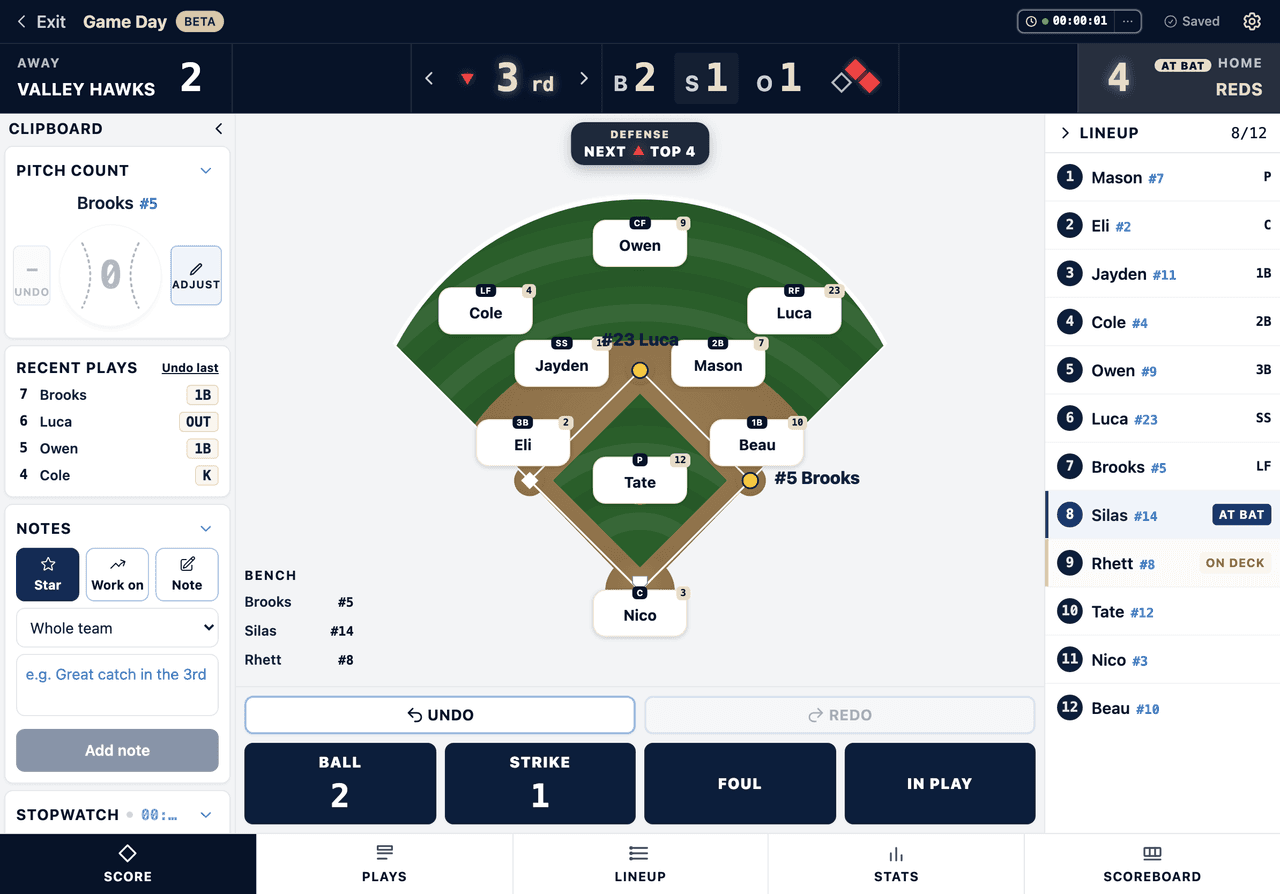
Recording the at-bat
The strip across the top of the screen shows who is up and who is on deck. When the at-bat ends, you record what it produced: a hit, a walk, a strikeout, an out, and so on.
- •On a ball in play, the tool asks where it went and how it was hit, so a grounder to short reads differently from a line drive to left.
- •Tap each base to say where the runner ended up. Runners the play forces are offered first, and one tap settles the common case.
- •You can name the fielder who made the play, which is what feeds putouts, assists, and errors.
- •None of the detail is a gate. Save works without a location tapped, and an unlabelled result still moves the game on, so nothing about the sequence traps you mid-inning.
The plays log
Every finished at-bat is written into the plays log as a sentence, not a code. You can read back an inning to settle an argument in the dugout without knowing what 6-3 means, and undo still walks back through it play by play.
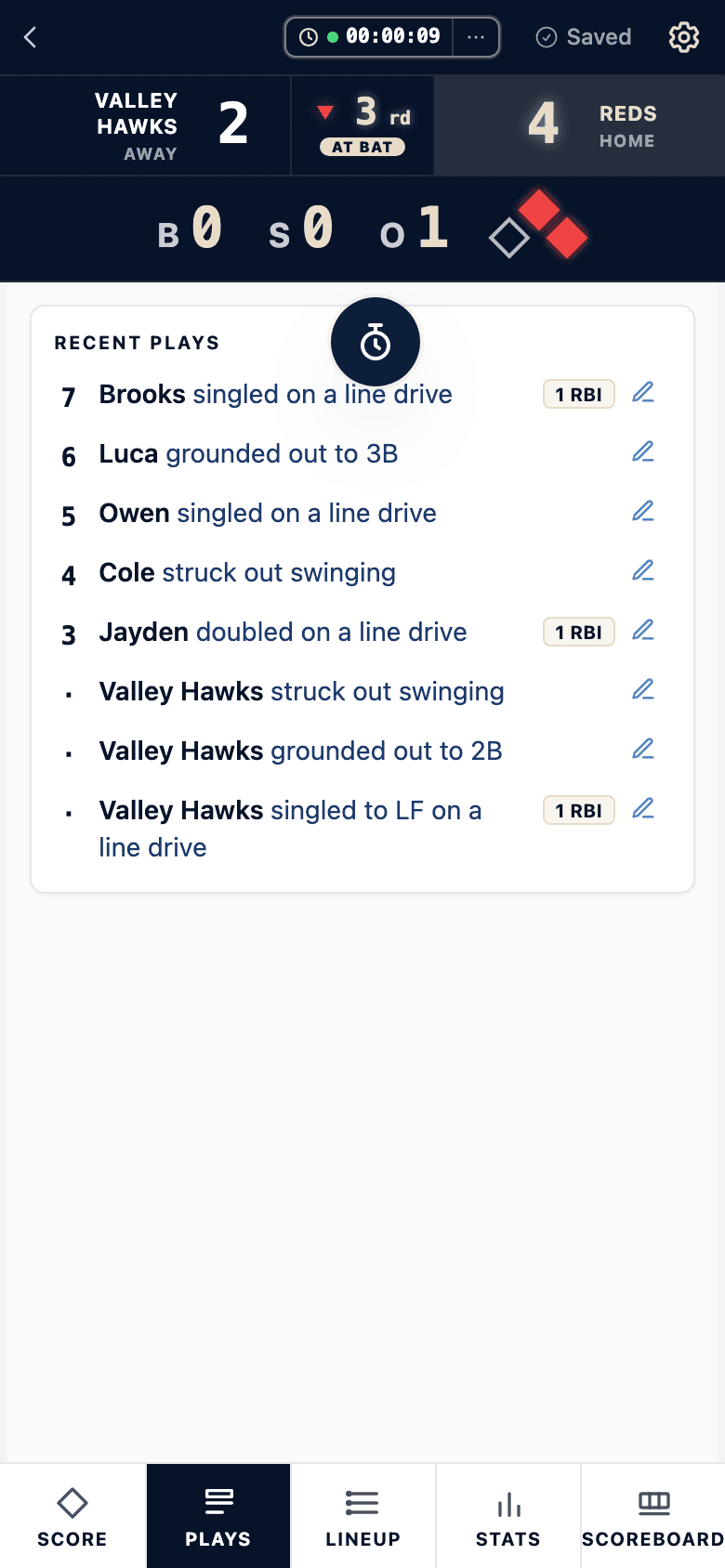
Runners between pitches
Not every base is taken on a batted ball. Tap a runner on the field and the same diamond opens: tap the base he reached, or mark him out.
Then say how he got there. A stolen base, a wild pitch, a passed ball, caught stealing, picked off, or just advanced, if it was none of those. Only the answers that fit the move are offered, and each tap moves exactly the runner you tapped: if a wild pitch moved two runners, tap them both.
Stolen bases land in the box score. The rest are on the play log, where the game reads back in order.
The box score
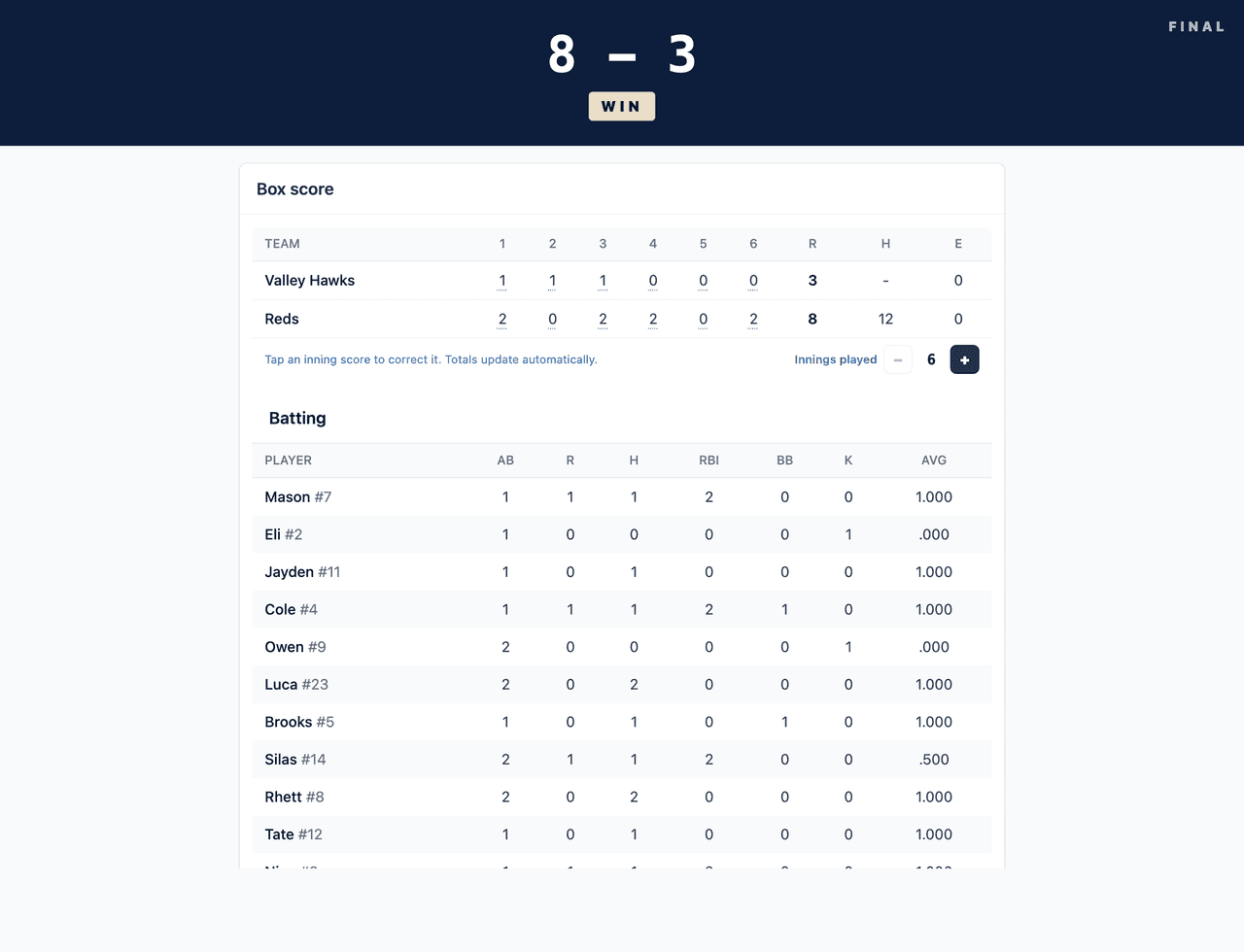
The Stats tab shows the game as it stands, and the post-game view shows it finished. Batting gives you at-bats, runs, hits, RBI, walks, strikeouts, and average. Pitching gives you innings pitched, hits, runs, walks, strikeouts, and pitches. Fielding gives you putouts, assists, and errors when you named fielders on the plays.
You can print or hand out the recap sheet from the same screen.
What it does not track
- •League mercy rules and run caps are not applied automatically.
- •Out codes stay general. An out is an out, not GO, FO, LO or PO.
- •Season fielding totals are not rolled up. Putouts, assists, and errors are per game.
Turning on Stat Tracking
Start from the lineup. Game Day opens out of the game it belongs to.
- 1
Open your team and pick the game from the schedule.
- 2
Build the lineup for that game, or let the lineup generator do it from your roster.
- 3
Press Start Game Day on the game.
- 4
On the setup screen, choose Stat Tracking. It is the default, so this is usually just confirming it.
- 5
Confirm whether you are the home team, set a pitch limit if your league has one, then start the game.
- 6
Choose what to track. The first time, the list of advanced stats opens on its own, all on. Turn off what your team does not need, like dropped third strikes or balks, and its button or question goes away. Change it any time from the Stats button at the top, the game setup screen, or your team settings.
- 7
While your team is in the field, tap balls and strikes as the umpire calls them. The count and the pitch count take care of themselves.
- 8
When an at-bat ends, tap the result.
- 9
On a ball in play, say where it went and how it was hit, then tap the base each runner reached.
- 10
Name the fielder who made the play if you want putouts, assists, and errors.
- 11
Check the Stats tab any time to see the box score so far.
- 12
End the game to lock the final score. The numbers roll into your season stats.
Softball
Identical for fastpitch and slowpitch. The count works the same way, so a walk and a strikeout resolve on their own just as they do in baseball.
Track your game for free
The Dugout Edge Game Day tool keeps the score, outs, runners, pitch count, and batting order in one place. No account needed, and it works right in your browser.
Open the free scorekeeperFrequently asked questions
Do I need to build a lineup before I can use Game Day?
Yes, and that is the point rather than a hurdle. Game Day opens from the game the lineup belongs to, and the lineup is what puts the batting order and the inning-by-inning positions on the board. Build it yourself or let the lineup generator do it from your roster in about thirty seconds. If you want to try the board with no team and no lineup at all, the free app at /scorekeeping-app runs the same tool on a roster you type in.
Is Stat Tracking harder than Basic mode?
It is more taps, but not harder taps, and none of them ask you to know notation. The extra work is recording each at-bat result and, on a ball in play, tapping where it went and whether it was on the ground or in the air. Most coaches find the first inning busy and the rest of the game routine. If you are also coaching third base, run Basic and hand a parent the tablet when you want stats.
What if I fall behind in the middle of a game?
Keep the scoreboard current and let the at-bats go. The score, outs, and bases are all directly tappable, and if you move past a half-inning with fewer than three outs recorded, the tool asks whether to go back and fill it in or count the inning as ended early.
What about games with no recorded at-bats?
They keep their score, pitch counts, and playing time, which all roll up across the season as usual. What they do not have is per-batter records, so they count toward games played but contribute no batting line.
Why is a walk not an at-bat?
By rule, a walk is a plate appearance but not an at-bat, which is why it does not lower a batting average. The tool handles the distinction for you: walks show in the BB column and stay out of AB.
Does the free version keep stats?
Yes. The free app at /scorekeeping-app offers a simple scoreboard (Basic) or full Stat Tracking, with the same box score. What an account adds is memory: the game saves to your team and the numbers roll into season stats. If you score a game free and then sign up, the at-bats come with you.
Can a parent run Stat Tracking on their own phone?
Yes, as long as they can sign in to the team. Just make sure only one person is scoring at a time, since two devices scoring the same game can disagree.
Keep learning
Lineup generator
Build the plan Game Day runs. Free, no account.
Recording the result of an at-bat
What each outcome means before you tap it.
Season batting and pitching stats
Where the numbers land after the game.
Letting parents follow the game
The box score you are building, on a link parents can open.
Score your first game
The whole flow, start to finish.
Pitch count tracking
Keeping arms inside league limits.
Coming 2026
Score every game by hand. Digitally.
A digital scorecard that works the way you already keep score: pencil in the 6-4-3, advance the runner, mark the backwards K. The same notation you know by heart, with nothing to store in a closet and nothing lost to a rained-out dugout. Built for coaches and fans who love the craft of scoring a game by hand. Launching in 2026. Join the waitlist and we will send early access the week it goes live.
Want to see it in context? Read what the digital scorekeeper does.